
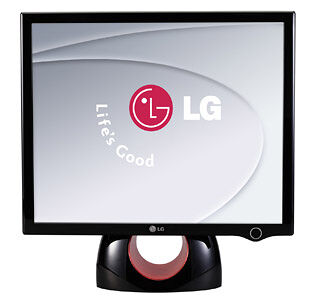
I bought this beast around Valentine's day when LG was offering a Valentine's discount. And I can tell you, I've never been happier with a monitor. Looking at the pictures, it makes the ring thing look like some aberration, but really it is a nice feature, and eventually I grew into it, since it's classy and modern. Sure, if you're looking for functionality only this could be a little overkill, but as a home PC, this is just right. There are no buttons, which means you use a software interface to control brightness and all the other adjustments, which actually is more than comfortable, because you can turn the program off and the monitor won't forget your settings. When the monitor is in sleep mode, the little LED on the bottom "breathes" pulsating in a rhythmic dance giving some extra bling to your monitor. The sleep mode can be turned off, as so can the LED at any given moment (like when you want to watch a movie or something. Both the LED button and the power button are touch sensitive, and it comes with an adapter to connect to either VGA (analogue) or DVI (digital) video cards. There are actually models within the models, and the best you can get (if you can find one) is the one that comes with 3000:1 contrast ratio and 2ms response time, which is killer. The only disadvantage I found in this monitor, is because all LCDs have view angles, this one was optimized to view from both sides and from the top (what you would expect for every person to want), but sometimes I throw my Beanbag couch in front of it to watch a movie, and I get way lower than the monitor's level, in which angle things get a little dark. Actually, if you view from any other side, you can pretty much look at them from complete 180 degree angles and if you can see the screen at all, you'll perfectly be able to see the image; leaving the only downside as the bottom view angle, which can be compensated in other ways (like standing further from the monitor when sitting in beanbags :D ) Oh, also the price ranges around AR$ 1000 pesos here in Argentina which should be around $300 dollars, but that is including tax and shipping and etc. So buying one of these in Europe and the U.S. should cost you just under 300 dollars which seems to me as more than a bargain for a monitor with such excellence. - Aphis
| Size? | 19" |
| Resolution? | 1280x1024 |
| Aspect? | 4:3 |
| Contrast? | 2000:1 |
| Brightness? | 300 cd/m² |
| Response time (GtG)? | 4ms |
| VGA inputs? | 1 |
| DVI-D inputs? | 1 |
| DVI-I inputs? | 0 |
| HDMI inputs | 0 |
| USB hub? | No |
| Speakers | No |
| Pivot? | No |
| Power consumption | 39 W |
| Weight (kg) | 6kg |
- Size (Size in inches)
The diagonal of the display in inches.
- Contrast (Contrast ratio)
Contrast is the difference between the brightest and darkest areas of the image. Contrast is given as a ratio between the brightest and the darkest areas, e.g. 800:1, and the higher the number the better the contrast.
- Aspect (Aspect ratio)
Aspect ratio is the width to height ratio of the projected image. Most often the aspect ratio is either 16:9 (widescreen) or 4:3. See more here
- Resolution (Native resolution)
Resolution is the number of horizontal pixels times the number of vertical pixels of the display area. Unlike older CRT monitors, flat screen monitors display information well only at the resolution they are designed for (a.k.a. the native resolution). This is due to the structure of the display, which has a fixed set of both vertical and horizontal dots (corresponding the resolution). If the resolution is changed, the display needs to scale the image to fit the screen.
- Brightness (Brightness)
Brightness (luminance) measures the amount of light the display produces. It is given as candelas per square meter (cd/m2). Usually the monitor with a higher luminance is concidered to be better one. A high luminance (such as 500 cd/m2) is desirable, if the monitor is used for viewing movies or other such entertainment.
- Response time (GtG) (Response time)
The response rate indicates how fast the monitor's pixels can change colors and it is measured as the time it takes for a pixel to change from one color to another and back. The rate is given as the transformation speed from Gray-to-Gray (GtG) in milliseconds (ms). Faster is better as it reduces the so called ghosting effect of a moving image (i.e. the trail or "ghost" of the previous image that stays is still faintly visible on the background).
- VGA inputs (Number of VGA inputs (D-sub))
A VGA connector (aka D-sub 15) is an analog three-row 15 pin DE-15 connector commonly used in video cards of computers, and thus it is a connection option that is almost always available.
- DVI-D inputs (Number of DVI-D inputs)
DVI-D input is the digital subversion of the DVI connector/cable and comes in two versions: a so called single link cable that supports a 1920x1080 image, and a dual link cable/connection that supports up to a 2048x1536 image. If the monitor has a digital-only DVI, make sure your video adapter supports DVI-D or DVI-I.
- USB hub (Does the monitor include an integrated USB hub)
Some modern displays have an integrated USB Hub, which makes it possible to connect different USB-devices (e.g. memory stick, mouse, keyboard) to the (side or the stand of the) display.
- Pivot (Does the device have pivot functionality (screen can be rotated 90 degrees))
Pivot functionality allows user to turn the screen 90 degrees without adjusting the monitor's stand. Pivot feature is extremely useful for people who use their monitors to read long documents, scanned documents, etc that are typically in U.S. Letter or A4 form.
- DVI-I inputs (Number of DVI-I inputs)
The DVI-I input is a digital DVI input that supports both the analog (DVI-A) and digital (DVI-D) subversion of the standard.
- HDCP (HDCP support)
HDCP (High-Bandwidth Digital Content Protection) is a DRM system designed to stop the unencrypted transmission of high definition video content from a source like a Blu-ray player and a display monitor. HDCP is used with DVI, DisplayPort and HDMI interfaces. All HDMI devices are bound to implement the DRM system. The lack of HDCP support may result in downgrade of video quality or even no playback at all.
- Panel type (Panel type)
There are many different panel technologies used in the production of LCD monitors. When buying a monitor, one should find out the panel type used, as it has a large effect on the specifications, performance, and on the price of the monitor as well. Different panel types are suitable for different kind of uses. The three most common main types of panels are (roughly in order from best to worst) S-IPS, S-PVA/MVA, and TN.
Review this product
Did you notice incorrect or missing information? Submit us corrections for these details
Do you have questions or comments regarding this product? Use our discussion forums to find out more about this and thousands of other products.


