
User User name Password  
   
Friday 5.12.2008 / 04:35 AM
Search:        In English   Suomeksi   På svenska
afterdawn.com > news > new hp digital media receiver connects your pc to a tv
Show topics
News
News

New HP "digital media receiver" connects your PC to a TV

17 June 2008 21:27 by Rich "vurbal" Fiscus | 13 comments

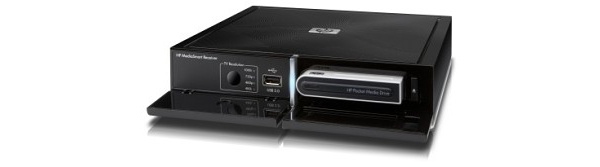
New HP digital media receiver connects your PC to a TV HP has expanded their MediaSmart product line with the addition of a new product called the Connect digital media receiver. Right now it's available for pre-order from Amazon.com, Best Buy, Circuit City, and NewEgg.

It isn't a receiver in the traditional sense of a home theater receiver. What a home theater receiver does for your DVD player and perhaps a cable or satellite receiver, the MediaSmart Connect does for your PC. It features standard high definition A/V outputs like HDMI and component video, allowing it to be hooked up directly to a HDTV, but gets its input from a home network.

Paired with either a computer running Windows Vista Home Premium or Ultimate it can act as a Media Center Extender. If you have Windows XP or any type of storage device with UPnP (Universal Plug and Play) support, including the HP MediaSmart Home Server, you can use the built-in MediaSmart interface instead to take advantage of your network storage.

The most interesting feature of the MediaSmart Connect is its built-in support fo CinemaNow, which offers movies for rental via download. It can also stream internet radio from Live365.

The Connect can stream a number of video formats across your home network, including MPEG-1, MPEG-2, MP@ML, MPEG-2 MP@HL, MPEG-4 ASP,WMV, WMV-HD, DVR-MS, and H.264. It's also DivX Certified.

Permalink to this article | Topics:

Get AfterDawn's news to your favourite feed reader! Share this story with your friends!


Related articles:

  • Cablevision wins appeal: remote DVR lawful after all (5 August 2008)
  • LG introduces digital Freeview Playback DVR with HDD (6 July 2008)
  • Image Entertainment to start DVD rental service (5 July 2008)
  • Linksys introduces router designed for multimedia (3 July 2008)
  • DivX makes distribution deal with Sony for TV shows (25 June 2008)
  • Mitsubishi to release first laser HDTV later this year (25 June 2008)
  • Amazon MP3 finally heading to Europe? (23 June 2008)
  • CES 2008: HP's MediaSmart Receiver connects HDTVs wirelessly to network (11 January 2008)
  • CinemaNow adds music videos from major labels (27 July 2007)
  •  

    « Previous news article
    Google still losing money on YouTube
    Next news article »
    Is Verizon too cheap or is fiber too expensive?
     Post your comment
    Discuss this article! 
    ripxrush (Newbie) 17 June 2008 22:25 Send private message to this user   
    cool, my old computer does the same thing!
    tin23uk (Junior Member) 17 June 2008 22:27 Send private message to this user   
    thats what my ps3 is for, and sometimes i play games on it.
    windsong (Junior Member) 17 June 2008 23:10 Send private message to this user   
    Quote:
    tThe most interesting feature of the MediaSmart Connect is its built-in support fo CinemaNow, which offers movies for rental via download.
    Ahh, therein is the rub. They eventually want to LOCK you out and force you to download their own crapware/pixellated movies. Someone should tell these incompetent boobs that they're about 10 years too late! We already HAVE every movie we could possibly want, be it Divx, H264, x264, Blu-Ray rip, Xvid, etc. And we do it quite effciently using Torrent, emule, usenet, what have you.

    Just finished downloading Return of the King at about 23 gigs..and since 500 gigs now are like 70 bucks...I think I'll buy another one! Then I'll stream it to my HDTV using...GASP..a component cable I bought for 8 bucks!

    HaHa! /Nelson
    iamgq (Newbie) 18 June 2008 1:28 Send private message to this user   
    Ill maker sure not to buy this...
    mspurloc (Member) 18 June 2008 2:14 Send private message to this user   
    It is the far-flung year of...(musical sting and echo effect)...2011!
    I attend a garage sale and right next to the ColecoVision and PC Jr, there it is: the HP box that, with CinemaNow and Netflix's help, brought the Internet down.

    Flash forward now, to 2015:
    The box is strewn across landfills from sea to sea, toxic chemicals leaching from its capacitors.

    Oh, brave new world, that has such crapples in it.
    c1c (Member) 18 June 2008 13:42 Send private message to this user   
    Can't you just use a long cable to hook up pc to tv and use a wireless mouse?
    sgriesch (Newbie) 18 June 2008 21:13 Send private message to this user   
    This is actually a step in the right direction IMHO. These are designed to work with their MediaSmart servers (which I own the 1 TB version and have upgraded to 2 TB). Stream media to any room with one from a central location. If the price point were around $200, this might be worth it.
    Yes, a computer and server could do the same thing. But having a computer with HDMI means you have a new computer or have upgraded your graphics card. Connecting your computer through any other connection is not the same. (And a component cable only goes to 1080i).
    Yes, a PS3 will do most of this too. Also, the PS3 works perfectly with the MediaSmart server. Know this one personally. The PS3 is $400 though.
    As far as the Cinemanow feature, I could care less too. They just want to say that it's compatible as a selling point. Pulling a movie from the server is more useful, as downloading movies becomes easier, and the optcal disc makes its exit.
    A full computer system would be better, but if this were much cheaper, then it could be a good alternative.
    maryjayne (Junior Member) 18 June 2008 22:35 Send private message to this user   
    I have my HTPC hooked up through the standard VGA connection and directly connected to my home theater. Looks good enough to me. Another worthless piece of equipment that no tech savy person will ever buy.

    This message has been edited since posting. Last time this message was edited on 18 June 2008 22:40

    emugamer (Member) 19 June 2008 12:14 Send private message to this user   
    My Popcorn Hour takes care off all that stuff. Plays all HD content I've thrown at it. Just doesn't have wireless integrated :-( But it was only $175, whereas the HP device is $350. I'll stick with the popcorn :-P

    This message has been edited since posting. Last time this message was edited on 19 June 2008 12:34

    six60six (Newbie) 19 June 2008 17:31 Send private message to this user   
    Originally posted by sgriesch:
    But having a computer with HDMI means you have a new computer or have upgraded your graphics card. Connecting your computer through any other connection is not the same.

    what about a dvi to hdmi cable?
    sgriesch (Newbie) 19 June 2008 19:00 Send private message to this user   
    Quote:
    Originally posted by sgriesch:
    But having a computer with HDMI means you have a new computer or have upgraded your graphics card. Connecting your computer through any other connection is not the same.

    what about a dvi to hdmi cable?

    That only does video. Otherwise, just use a DVI input (if you have one). And yes the DVI is not as new as the HDMI, so the graphics card/computer could be a little older.
    Still, the price point needs to be low for this thing to fly. If it is $350 as suggested earlier, it's probably going to sink. Just buy a new computer. It's more useful.
    emugamer (Member) 19 June 2008 19:19 Send private message to this user   
    Quote:
    Quote:
    Originally posted by sgriesch:
    But having a computer with HDMI means you have a new computer or have upgraded your graphics card. Connecting your computer through any other connection is not the same.

    what about a dvi to hdmi cable?

    That only does video. Otherwise, just use a DVI input (if you have one). And yes the DVI is not as new as the HDMI, so the graphics card/computer could be a little older.
    Still, the price point needs to be low for this thing to fly. If it is $350 as suggested earlier, it's probably going to sink. Just buy a new computer. It's more useful.
    Well, I received a promotion email from newegg for this device and it was $350, or $345. I deleted the email though :-P
    sgriesch (Newbie) 19 June 2008 23:30 Send private message to this user   
    Quote:
    Quote:

    That only does video. Otherwise, just use a DVI input (if you have one). And yes the DVI is not as new as the HDMI, so the graphics card/computer could be a little older.
    Still, the price point needs to be low for this thing to fly. If it is $350 as suggested earlier, it's probably going to sink. Just buy a new computer. It's more useful.
    Well, I received a promotion email from newegg for this device and it was $350, or $345. I deleted the email though :-P

    That's ok. At least it gives all of us a good idea of the cost. If that's really it, then IMHO it is a little pricy for what it does. I do like their MediaSmart Server, though. It works well, and it was easy to install and use.
     Post your comment
     

    Subscribe to our newsfeed

    Get the latest headlines delivered directly to your favourite RSS reader or content aggregation service by using the links below.

    AfterDawn.com: News - RSS feed
    Add to Google
    Add to My Yahoo!
    Add to MyMSN

    Search for headlines

    Search through our news archive.

    Last week's most popular software downloads

    Digital video: AfterDawn.com | AfterDawn Forums | DVD X Copy Forums
    Music: MP3Lizard.com
    Gaming: Blasteroids.com | Blasteroids Forums
    Software: Software downloads
    Blogs: User profile pages
    RSS feeds: AfterDawn.com News | Software updates | AfterDawn Forums
    International: AfterDawn in Finnish | AfterDawn in Swedish | download.fi | fin.MP3Lizard.com
    Navigate: Search | Site map
    About us: About AfterDawn Ltd | Advertise on our sites | Rules, Restrictions, Legal disclaimer & Privacy policy
    Contact us: Send feedback | Contact our media sales team
     
      © 1999-2008 by AfterDawn Ltd.

