
|
17 October 2008 20:48 by Andre "DVDBack23" Yoskowitz
| 11 comments
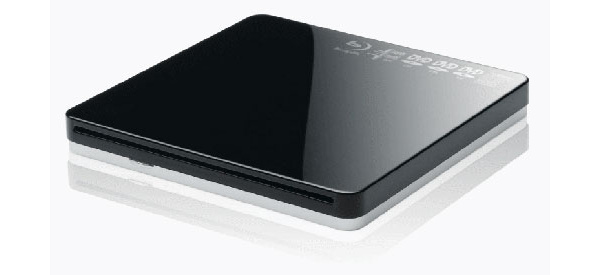
The Hong-Kong based electronics company AMEX Digital has announced the launch of a new slim Blu-ray drive for both Macs and PCs.
The Portable Blu-ray Super Multi Drive has the design of the MacBook Air's Superdrive and will allow for the reading and writing of Blu-ray discs in BD-R and BD-RE formats and both full-sized 12cm and mini 8cm sizes. Users can also burn to dual-layer 50GB discs using the drive's USB 2.0 port.
The company says it's patented Quiet Drive Technology "reduces the noise level of the drive, while a liquid crystal tilt/blur compensator compensates for warped discs for a more reliable writing process."
The drive can only burn Blu-ray discs at 2x speeds, which practically makes the drive useless when compared to newer Sony and Buffalo drives which can burn at up to 8x speeds.
The drive is now available, and is retailing for $289 USD.
Permalink to this article
| Topic: Blu-ray
| |
Related articles:
OWC launches Blu-ray/HD DVD burner with multiple inputs (23 October 2008)
Insignia Blu-ray player hits $199 USD price point (20 October 2008)
Plextor releases first external Blu-ray drive (18 October 2008)
Playboy moves to digital, drops DVD (18 October 2008)
Sherwood introduces first Blu-ray player (16 October 2008)
"Blu-ray is a bag of hurt," says Apple (15 October 2008)
Sony debuts Hancock through HDTVs before DVD (14 October 2008)
Panasonic bringing Blu-ray recorders to the US next year (14 October 2008)
Blu-ray players hit new low price point (14 October 2008)
Blu-ray set-top sales to explode over next 4 years, says report (12 October 2008)
|
|
|
| Discuss this article! |
| 13thHouR (Inactive) 18 October 2008 5:18 |
|
So can this burner do AACS authoring, and will your HD home movies actually playback in full HD on them stand alone blu ray players?
HDCP secure paths and downsampling eh!
Well you can have that all important AACS stamped on your home movies by these guys! http://www.pacificdisc.com/PricingBluRay.html
Quote: # Mastering Fees of $500 per layer apply on all new orders, regardless of quantity.
# AACS is required on all Blu-ray discs and costs $1,585 per title plus $0.05/disc (see full description below)
# Prices include all royalties for initial patent pool gathering as June 2006
Any Blu-ray disc (BD-25 or BD-50) with any video content, be it for commercial or non-profit purposes must pay the AACS fees. The AACS fees, which are our true costs, without any mark-up, include: an AACS Media Key, AACS Content Certification and all AACS Order Processing Fees.
The RIAA - BPI - IFPI - CRIA - Ect - Ect Are: SONY, UNIVERSAL, WARNER GROUP, EMI.
The MPAA Are: SONY, UNIVERSAL, WARNER GROUP, DISNEY, PARAMOUNT, FOX.
Dont allow them to hide behind the trade body names, name and shame em.
This message has been edited since posting. Last time this message was edited on 18 October 2008 7:12
|
| error5 (Senior Member) 18 October 2008 9:20 |
|
Unencrypted playback of BDMV discs burned to BD-R/RE is now allowed on the PS3 and standalones with latest firmware.
I've done dozens of BDMV burns of 1080i home video and all of them play on my Panasonic and PS3 and on friends' and relatives' standalones - Samsung and Sony among others. They're also playable on PC drives using Cyberlink.
AACS, or the lack thereof, is no longer an issue.
Quote: HDCP secure paths and downsampling eh!
If AACS was still required, the BD-R disc wouldn't be downsampled - it wouldn't play at all!
This message has been edited since posting. Last time this message was edited on 18 October 2008 11:13
|
| 13thHouR (Inactive) 18 October 2008 12:00 |
|
Originally posted by error5: Unencrypted playback of BDMV discs burned to BD-R/RE is now allowed on the PS3 and standalones with latest firmware.
I've done dozens of BDMV burns of 1080i home video and all of them play on my Panasonic and PS3 and on friends' and relatives' standalones - Samsung and Sony among others. They're also playable on PC drives using Cyberlink.
AACS, or the lack thereof, is no longer an issue.
Quote: HDCP secure paths and downsampling eh!
If AACS was still required, the BD-R disc wouldn't be downsampled - it wouldn't play at all!
that's a turn up for the books i wasn't aware of, i knew that the ps3 and other sony blu-ray players did play BDMV until sony blocked this with a firmware update ( and other manufacturers hardware so don't get your knickers in a twist pro sony ppl) but i hadent realised that had now reversed the bad decision.
this is better news, can it only support 1080i as 720p looks far superior, or can you burn to 720p/1080p?
can you author into your own movies the bd-j menus yet or is this still blocked?
The RIAA - BPI - IFPI - CRIA - Ect - Ect Are: SONY, UNIVERSAL, WARNER GROUP, EMI.
The MPAA Are: SONY, UNIVERSAL, WARNER GROUP, DISNEY, PARAMOUNT, FOX.
Dont allow them to hide behind the trade body names, name and shame em.
This message has been edited since posting. Last time this message was edited on 18 October 2008 12:19
|
| mike.m (Member) 18 October 2008 14:49 |
|
Quote: The drive can only burn Blu-ray discs at 2x speeds, which practically makes the drive useless when compared to newer Sony and Buffalo drives which can burn at up to 8x speeds.
Unless you got money to waste, who in their right mind would burn a blu-ray disc at 8x speeds, you wouldn't do that with a dvd, then why take the chance of making a coaster. Yea its nice to have, but that doesn't make this drive useless.
|
| error5 (Senior Member) 18 October 2008 22:22 |
|
Originally posted by 13thHouR: this is better news, can it only support 1080i as 720p looks far superior, or can you burn to 720p/1080p?
can you author into your own movies the bd-j menus yet or is this still blocked?
I use ULead DVD Movie Factory Plus 6 with the HD Power Pack.
http://www.ulead.com/dmf/plugin.htm
You can do 720p or 1080i/p depending on your source. I use 1920x1080i since this is what I get with my Canon HF100 high-def videocam. If you have a video source that's 720p or 1080p then you can do that too. There is no loss of resolution when you author in BDMV.
I don't use BD-J since I only need simple menus which I can get with the ULead authoring software.
If you need comprehensive BD-J tools then you need professional level software such as Sonic Scenarist which costs $35,000.
http://dv411.com/bdj.html
The fact remains that you don't need AACS for your home video burns.
This message has been edited since posting. Last time this message was edited on 18 October 2008 22:24
|
| borhan9 (AfterDawn Addict) 20 October 2008 6:13 |
|
|
I rather wait for prices to still drop and speeds go up :)
|
| 13thHouR (Inactive) 20 October 2008 7:13 |
|
Originally posted by borhan9: I rather wait for prices to still drop and speeds go up :)
Yeah ain't it, with optimum speed not accounting for jitter correction or buffering ect it would take 45mins to fill a single layer disc and 90mins for a dual layer, lmfao...
I'm still very concerned about backing up 50gigs of data to one disc, as it's a lot of info to lose, if blu-ray becomes the norm, i'll be doing two or three backups as atm, a 4.7 gig dvd of data, is a lot easier to replace once the disc(s) become scratched, and i'm guessing that seems blu-ray divots are a lot smaller & that the blu ray data layer is closer to the surface of the disc, compared to dvd the issue will be greatly enhanced.
And before the pro sony crowd and PR trolls jump down my throat citing that blu-ray coating is bullet proof, that's what they said about cd and dvd....
The RIAA - BPI - IFPI - CRIA - Ect - Ect Are: SONY, UNIVERSAL, WARNER GROUP, EMI.
The MPAA Are: SONY, UNIVERSAL, WARNER GROUP, DISNEY, PARAMOUNT, FOX.
Dont allow them to hide behind the trade body names, name and shame em.
This message has been edited since posting. Last time this message was edited on 20 October 2008 7:22
|
| uruz7 (Inactive) 21 October 2008 1:49 |
|
That's OK!But take a closer look following link,It's great to DVD and PSP converter
spam removed
This message has been edited since posting. Last time this message was edited on 21 October 2008 8:28
|
| core2kid (Senior Member) 14 November 2008 21:26 |
|
So how long would a 2x Blu-Ray drive take to actually fill up a 25GB disc? A 4x DVD+RW takes about 20 minutes to fill up 4.7GB Disc.
|
| LOCOENG (Moderator) 15 November 2008 0:15 |
|
Originally posted by core2kid: So how long would a 2x Blu-Ray drive take to actually fill up a 25GB disc? A 4x DVD+RW takes about 20 minutes to fill up 4.7GB Disc.
About 20 minutes.
Quote: CD, DVD and Blu-ray writing speeds
Modern Compact Discs support a writing speed of 52X and higher, and some modern DVDs support writing at 16X or higher. It is important to notice that the speed of 1X in CD writing is not the same as the speed of 1X when writing to a DVD. When writing to a DVD at 1X, the data is transferred at a speed of approximately 1352 kilobytes per second[2]; in contrast, writing to a CD at 1X speed results in a data transfer of 150 kilobytes per second. Thus, in brief, one X in DVD writing speeds is about 9 times more than one X in CD writing speeds. However, these speeds are not constant, and depend on the type of data written to the disc.[3]
For Blu-ray disks, 1x speed is defined as 36 megabits per second (Mbit/s), which is equal to 4.5 megabytes per second (MB/s).[4] However, as the minimum required data transfer rate for Blu-ray movie disks is 54 Mbit/s, the minimum writing speed for Blu-ray writers should be 2X.
Historically, the 1X writing speed is equivalent to the 1X reading speed, which in turn represents the speed at which a media can be entirely read in 74 minutes. Those 74 minutes come from the maximum play time that the Red Book (audio CD standard) specified for a digital audio CD (CD-DA), although nowadays most recordable CDs can hold 80 minutes. The DVD and Blu-ray discs have higher capacity, so reading or writing those discs in the same 74 minutes incurs a higher data transfer rate.
http://en.wikipedia.org/wiki/X_(writing_speed)
|
| error5 (Senior Member) 15 November 2008 0:17 |
|
Originally posted by core2kid: So how long would a 2x Blu-Ray drive take to actually fill up a 25GB disc? A 4x DVD+RW takes about 20 minutes to fill up 4.7GB Disc.
You can't compare numbers on BluRay and DVD burners since the data throughputs are different. The data throughput of the Pioneer 101A 2x burner was clocked at around 67 mbps (theoretical maximum of 72 mbps). It took about 45 minutes to master 22GB of data on to a 25GB single layer BD-R at the 2x speed.
http://www.pcworld.com/article/125581/fi...impressive.html
This message has been edited since posting. Last time this message was edited on 15 November 2008 0:33
|
|
|
Latest newsLatest news from AfterDawn.com. Wal-Mart selling $78 Blu-ray player on Black Friday, other great deals 22 Nov, 2009 PS3 Video Store live in Europe 22 Nov, 2009 'Zombieland' director speaks of piracy, gets angry via Twitter 22 Nov, 2009 | 22 comments YouTube blocking use of native video API on some devices 22 Nov, 2009 | 1 comment iPhone headed to South Korea 22 Nov, 2009 California approves of new energy standards for HDTVs 22 Nov, 2009 | 8 comments Barnes & Noble Nook sold out until 2010 22 Nov, 2009 | 2 comments Gameloft moving development from Android platform 22 Nov, 2009 | 6 comments YouTube adds automatic captions for deaf viewers 22 Nov, 2009 | 2 comments Lady Gaga earned $167 from 1 million plays via Spotify 22 Nov, 2009 | 17 comments Proposed UK law would force ISP sanctions against file sharers 21 Nov, 2009 | 12 comments Xbox Live Gold free for the weekend 20 Nov, 2009 | 11 comments
More news... 
Search for headlinesSearch through our news archive. 
Latest threadsRecently updated discussion threads. More... 
Last week's most popular software downloads
Most popular devicesLast week's most popular products in our product comparison service. More products... 
Top linksMost popular links - Blasteroids.com
Download game trailers, demos and more - TorrentReactor.Net
The most active torrents on the web - Digital-Digest
Latest DivX, XviD, DVD, Blu-Ray, HD DVD News - OpenSubtitles.org
download DivX subtitles from the biggest open database - CDRInfo.com
The Hardware Authority - DVDHelp.us
DVD help, tutorials, FAQ, and very popular free help forum! - dvd ripper
rip DVD to VCD, DivX, MPEG, SVCD, AVI easily and quickly. - Torrentreactor.TO
The most active torrents on the web

|

