

Review: mp3HD lossless codec
Last week we reported that Thomson had released its new lossless audio codec, mp3HD which promised to keep full CD-quality sound (100% bit-exact replica of CD tracks) while also remaining compatible with all media players that playback MP3.
The codec uses the standard .mp3 file extension and stores both the mp3HD stream along with a lossy MP3 stream in the same file, which allows for backwards compatibility. By doing so, users can playback the higher quality version on, let's say, 7.1 stereo systems at home, while still being able to enjoy a 320kbps bitrate standard MP3 track on their iPod without the need to rip the track twice.
If you open a new AfterDawn tab, and hit the downloads section, you will find the mp3HD software tools section. If you want to test right along with this review, download the Toolkit for your operating system. I am using Vista, but there is also a Linux version available. (Sorry Macs)
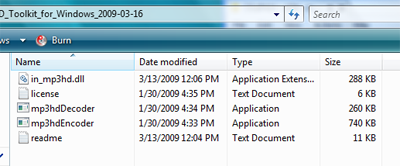
Download and unzip the entire folder. The contents should look like the picture at right if you are using the Windows toolkit.
I ripped my own retail CD using Exact Audio Copy and the external decoder in the Toolkit. For more information on where to download EAC and how to initially set it up, please read our guide here: EAC installation and configuration. To use mp3HD with EAC please use the following instructions (as per the readme in the toolkit):
- Open the "Compression options" from the "EAC" menu
- Go to the "External Compression" tab
- Enable the "Use external program for compression" option
- Set "Parameter passing scheme" to "User Defined Encoder"
- Write ".mp3" into the "Use file extension" field
- Type the link to your mp3hdEncoder.exe file into the
"Program, including Path, used for compression" field
- Insert the following text into the Additional command-line option field:
-if %s -of %d -br %r000 -Artist "%a" -Album "%g" -Title "%t" -Year "%y"
-Track "%n" -Genre "%m" -Encoder "Thomson mp3HD encoder v1.4"
- Select the desired bit rate in the "Bit rate" field.
- Uncheck the "Add ID3 tag" option
The first track ripped, was 4:23 long and ripped at 768kbps and finished at almost 25MB in size. Because the toolkit comes with a decoder plug-in for Winamp, playback was a cinch, and the quality was certainly very good. When trying to play in WMP and iTunes however, the standard 320kbps MP3 played.
When transferred to a SanDisk Sansa and my iPod Touch, the files played without any problems, but at 320kbps.
I believe the new format has many pros, the best certainly being the outstanding quality it produces with reasonable file sizes. That however, can also be a con. Most flash memory based media players do not offer too much storage capacity (most are 32GB or much less) and adding 24-50 MB files will eat that space up in no time, especially given the fact that those players will not play the HD version but rather a 320kbps MP3. For home listening however, the quality is very good, and rivals FLAC for file size compression. If you have older HDD-based media players, that can hold up to 160 GB or more, this format may be for you, as you get the HD quality to keep at home for sound system playback while also getting the high quality MP3 for playback on your media device.
Regardless, I would say it is worth testing at the very least, and may be a worthy format to begin backing up your CD collections with.
The codec uses the standard .mp3 file extension and stores both the mp3HD stream along with a lossy MP3 stream in the same file, which allows for backwards compatibility. By doing so, users can playback the higher quality version on, let's say, 7.1 stereo systems at home, while still being able to enjoy a 320kbps bitrate standard MP3 track on their iPod without the need to rip the track twice.
Putting the format to the test
If you open a new AfterDawn tab, and hit the downloads section, you will find the mp3HD software tools section. If you want to test right along with this review, download the Toolkit for your operating system. I am using Vista, but there is also a Linux version available. (Sorry Macs)
Download and unzip the entire folder. The contents should look like the picture at right if you are using the Windows toolkit.
I ripped my own retail CD using Exact Audio Copy and the external decoder in the Toolkit. For more information on where to download EAC and how to initially set it up, please read our guide here: EAC installation and configuration. To use mp3HD with EAC please use the following instructions (as per the readme in the toolkit):
- Open the "Compression options" from the "EAC" menu
- Go to the "External Compression" tab
- Enable the "Use external program for compression" option
- Set "Parameter passing scheme" to "User Defined Encoder"
- Write ".mp3" into the "Use file extension" field
- Type the link to your mp3hdEncoder.exe file into the
"Program, including Path, used for compression" field
- Insert the following text into the Additional command-line option field:
-if %s -of %d -br %r000 -Artist "%a" -Album "%g" -Title "%t" -Year "%y"
-Track "%n" -Genre "%m" -Encoder "Thomson mp3HD encoder v1.4"
- Select the desired bit rate in the "Bit rate" field.
- Uncheck the "Add ID3 tag" option
The first track ripped, was 4:23 long and ripped at 768kbps and finished at almost 25MB in size. Because the toolkit comes with a decoder plug-in for Winamp, playback was a cinch, and the quality was certainly very good. When trying to play in WMP and iTunes however, the standard 320kbps MP3 played.
When transferred to a SanDisk Sansa and my iPod Touch, the files played without any problems, but at 320kbps.
Conclusion
I believe the new format has many pros, the best certainly being the outstanding quality it produces with reasonable file sizes. That however, can also be a con. Most flash memory based media players do not offer too much storage capacity (most are 32GB or much less) and adding 24-50 MB files will eat that space up in no time, especially given the fact that those players will not play the HD version but rather a 320kbps MP3. For home listening however, the quality is very good, and rivals FLAC for file size compression. If you have older HDD-based media players, that can hold up to 160 GB or more, this format may be for you, as you get the HD quality to keep at home for sound system playback while also getting the high quality MP3 for playback on your media device.
Regardless, I would say it is worth testing at the very least, and may be a worthy format to begin backing up your CD collections with.




