|
29 March 2009 18:02 by Andre "DVDBack23" Yoskowitz
| 16 comments
Review: CyberLink PowerDVD 9
Getting Started
The following is a review of the DVD playback software, Cyberlink PowerDVD 9 Ultra, the latest upgrade in the popular series. You can use the software to playback DVDs, Blu-ray titles, and video files including HD formats. Making the latest version different from previous editions however, is the addition of TrueTheater technology, which allows for either automated or manual upscaling of standard DVDs. Another addition is FancyView, a new way to navigate your DVDs and chapters visually.
DVD Playback
The main purpose of the software is for DVD playback and it does so, for the most part, flawlessly. The new innovation for PowerDVD 9 is TrueTheater, which upscales standard DVDs, adding sharpness, brightness, and smoothing.
Although the quality is much improved when using TrueTheater, it takes up significant more CPU load, in my example jumping from 15 percent without it on to 28 percent with it on.
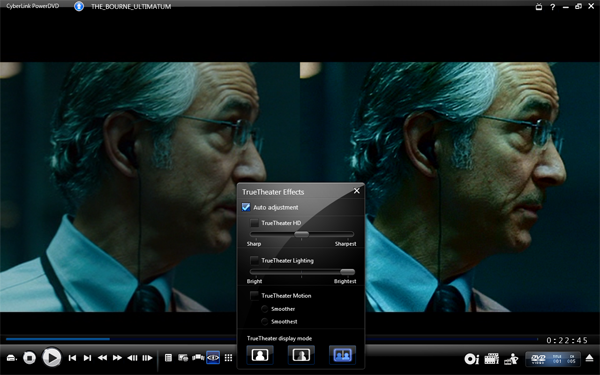
As you can see from the screencap, I have selected auto adjustment for the TrueTheater effects, and the result is very noticeable. To use the effects manually, you will need to turn off "hardware acceleration" from the options menu. TrueTheater HD controls the sharpness, TrueTheater Lightning controls the brightness, and TrueTheater Motion allows all 24 fps content to be outputted at 60, 66, or 72 FPS. If you are on a computer monitor the results will most likely be minimal, but outputting to a large HDTV, the interpolation works well.
From the extra options menu during playback, wide screen movies can be made to full screen and digital zoom can be used as well, in either 4x or 9x. Image capture is available in "more functions" as well, along with karaoke mode, "bookmarks" and other standards from previous editions.
FancyView
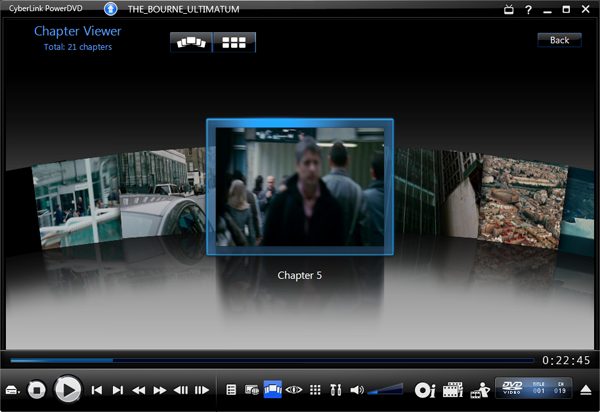
Another new addition is the navigation interface of FancyView. To bring it up, during playback, hit the Chapter Viewer button (as pictured) and scroll through the different chapters in a 3D interface. Not really all that useful or necessary, but effective and appealing.
Cinema Mode
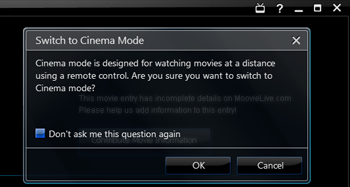
PowerDVD 9 also adds Cinema Mode, giving users who hook up to HDTVs an easier interface. It is better suited for users using a remote control and because it works well with Windows Media Center, Blu-ray support is now available as well for TV playback.
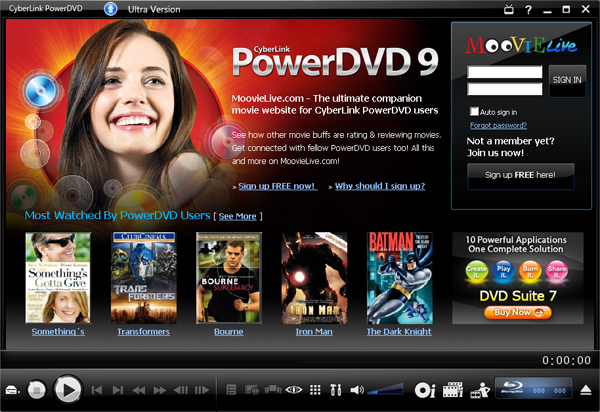
There are other features such as MoovieLive: Movie Collection and Movie Remix, that I will not go into as they do not directly affect video playback of any sort, and are more gimmicks then anything.
Conclusion
The new additions to PowerDVD 9 are very practical, and improve the viewing experience, although CPU load is extended. PowerDVD remains a leader in DVD and Blu-ray playback, but the main concern for me is the price. Free alternatives such as VLC offer excellent video file and DVD playback but do notably lack Blu-ray support. If you are looking for a powerful Blu-ray player that doubles as a media center, this is at the top of its class and I would fully recommend it. If you just need no-gimmick DVD playback and don't care for upscaling, you cant go wrong with free VLC.
Permalink to this article
| Topic: Blu-ray
| |
Related articles:
Review: ZapMyTV alpha (27 August 2009)
Catalog Your Music - 4 Programs Compared (3 August 2009)
Review: TMPGEnc Authoring Works 4 (30 July 2009)
Funai sued over TV patent infringement (22 May 2009)
Momitsu releases region-free Blu-ray player (5 April 2009)
Review: Nero LiquidTV - TiVo on your PC (1 April 2009)
Action video games improve eyesight, says study (29 March 2009)
|
|
|
| Discuss this article! |
| windsong (Junior Member) 29 March 2009 18:55 |
|
|
Looks like the chicks keep getting younger on the startup screen. Jailbait? :)
|
| borhan9 (AfterDawn Addict) 1 April 2009 19:53 |
|
|
This is all well and good however i like my older version it is as good as any other. I would love to try this out regardless.
|
| alewis (Newbie) 2 April 2009 12:48 |
|
Yes, hopefully it can remember that it is a DVD player, and not bloat itself, a la nero (imho, Nero v4 was the bees knees for 95% of CD/DVD copying tasks... then it bloated). I have a soft spot for PowerDVD, back in 2000-2002 when DVD playing wasn't always straightforwards, PowerDVD was a quick, simple, easy-to-use low-overhead solution. Did exactly what it said on the can, no more and no less.
|
| avoidz (Junior Member) 2 April 2009 20:47 |
|
Agreed with the splash screen girls comment :)
I still use version 6 for DVDs; it does what I want, and I don't have a need for Blu-ray playback.
|
| kapo13 (Junior Member) 2 April 2009 23:48 |
|
|
Have the brought back the ability to play files from the HDD ?
With the price of a new player for my PC , i`d rather have my HDD
spinning for 2 hours of a movie
Why did they ever drop that option ?
Does any other software have that option for BR ?
Thanks
|
| avoidz (Junior Member) 3 April 2009 5:58 |
|
Originally posted by kapo13: Have the brought back the ability to play files from the HDD ?
With the price of a new player for my PC , i`d rather have my HDD
spinning for 2 hours of a movie
Why did they ever drop that option ?
Thanks, I'd forgotten about that. Which version was it that dropped the feature? Cheers.
|
| alewis (Newbie) 3 April 2009 9:21 |
|
Not sure if this answers your question, but VLC and Media Player Classic can play back files from disk... depends on your source ;-)
|
| avoidz (Junior Member) 3 April 2009 10:17 |
|
I use KMPlayer for all media playback except DVD. It has VOB support, so I can use that. Otherwise I'll stick with PDVD6 :)
|
| kapo13 (Junior Member) 3 April 2009 12:18 |
|
The last version to have from HDD support was
v7.3_Build_3319a
So avoidz are you saying KMPlayer will play BR files
from the HDD ? i ve never heard of that player
And alewis , it would be sweet if VLC amd media player classic would
play BR
thanks for replies
Cheers
|
| alewis (Newbie) 3 April 2009 15:44 |
|
|
hence the wording of the comment ....
Native support for Blue-Ray would be great, and I imagine it wont be long <insert sardonic still waiting smiley> :-)
|
| avoidz (Junior Member) 5 April 2009 10:18 |
|
Thanks, kapo13. As I said in my earlier post, I don't have a need for Blu-ray playback (and KMPlayer doesn't support it yet, no).
|
| Jemborg (Member) 7 April 2009 3:44 |
|
The usual go for playing Blu-rays off HDD is (using the latest AnyDVD_HD):
1) Make an .iso using AnyDVD_HD itself or with a app like Imgburn.
2) Mount the image with 'Virtual Clone Drive' free from- http://www.slysoft.com/en/virtual-clonedrive.html
3)Play with Cyberlink or somesuch.
HOWEVER, this does NOT seem to be working with this new version of Cyberlink. So...
Its a lot easier being righteous than right.
This message has been edited since posting. Last time this message was edited on 7 April 2009 3:45
|
| informgry (Newbie) 7 April 2009 3:56 |
|
|
Thank you very much Andre for your Preview, it was very informative and done in a very professional manner. Please keep up the good work.
informgry
|
| kapo13 (Junior Member) 7 April 2009 22:42 |
|
Thanks Jemborg
Ya its a real pain having to make a 30 gig + iso
But it seems the only way right now
So this new version wont even play iso`s of BR ?
I upgraded some time ago to version 8 , and it had problems
with a few movies like Max Payne , telling me i need to upgrade
to play it . im not sure what that was all about
The movie wasnt that good IMO , so i got rid of it , but
curiosity makes me wanna get it again to see if Version 9 will play
it
Anyhow Cheers
|
| olavinto (Junior Member) 8 June 2009 13:41 |
|
Originally posted by kapo13: The last version to have from HDD support was
v7.3_Build_3319a
So avoidz are you saying KMPlayer will play BR files
from the HDD ? i ve never heard of that player
And alewis , it would be sweet if VLC amd media player classic would
play BR
thanks for replies
Cheers
I've had a license since version 5. At least I've always had the ability to play back files from the HDD, in version 7, 8 and 9. You can also set PowerDVD as the default player for suppported file types in settings...
|
| Jemborg (Member) 16 June 2009 3:40 |
|
Originally posted by kapo13: Thanks Jemborg
Ya its a real pain having to make a 30 gig + iso
But it seems the only way right now
So this new version wont even play iso`s of BR ?
I upgraded some time ago to version 8 , and it had problems
with a few movies like Max Payne , telling me i need to upgrade
to play it . im not sure what that was all about
The movie wasnt that good IMO , so i got rid of it , but
curiosity makes me wanna get it again to see if Version 9 will play
it
Anyhow Cheers
No worries kapo13.
I've had no problems with Ver 8. Yes, the upgrade thing occurs but goes away when you install or update to the very latest AnyDVD_HD version. Just do that and you should have no problems mate. New Blu-rays have new keys etc.
A friend reported to me that the new Cyberlink V9 was not working with the above procedure I described- that may change. I would be very interested to know how you go.
(Btw, Cyberlink V7 is the last one to support the old HD_DVD format... and some people prefer that version.)
Yes, it is rather a pain the 30+ gig thing. It's possible to transfer it into .h246 format for a much more reasonable size (perhaps as a 1080i too) to fit it onto a dual-layer disc. But getting the sound right is tricky I understand. It would be nice to have some form of DVD_Shrink for HD, eh? Easy to use etc...
Regards.
|
|
|
Latest newsLatest news from AfterDawn.com. Verizon doubles early termination fee for smartphones 8 Nov, 2009 | 6 comments What does Google know about you? Try 'Dashboard' 8 Nov, 2009 | 4 comments Blu-ray 'Managed Copy' to start in December, lacking hardware support 8 Nov, 2009 | 7 comments Myka introduces ION media center set-top 8 Nov, 2009 American texters send 4.1 billion per day 8 Nov, 2009 | 4 comments Skype is finally free to be independent 8 Nov, 2009 Technology leads to enhanced social worlds, says study 8 Nov, 2009 | 1 comment iPhone app developer sued for 'stealing' user's numbers 7 Nov, 2009 | 6 comments Amazon, Disney, Pixar start deep Blu-ray promotion 7 Nov, 2009 | 10 comments BlackBerry passes iPhone in market share again 7 Nov, 2009 | 1 comment Digital stores will not sell Modern Warfare 2 due to Steamworks 7 Nov, 2009 | 11 comments Boxee beta coming December 7th 7 Nov, 2009
More news... 
Search for headlinesSearch through our news archive. 
Latest threadsRecently updated discussion threads. More... 
Last week's most popular software downloads
Most popular devicesLast week's most popular products in our product comparison service. More products... 
Top linksMost popular links - Blasteroids.com
Download game trailers, demos and more - TorrentReactor.Net
The most active torrents on the web - Digital-Digest
Latest DivX, XviD, DVD, Blu-Ray, HD DVD News - OpenSubtitles.org
download DivX subtitles from the biggest open database - CDRInfo.com
The Hardware Authority - DVDHelp.us
DVD help, tutorials, FAQ, and very popular free help forum! - Torrentreactor.TO
The most active torrents on the web - dvd ripper
rip DVD to VCD, DivX, MPEG, SVCD, AVI easily and quickly.

|