
 Since the introduction of the CD it has become easy to own music practically forever. But as CD collections grow it can be difficult to keep track of what you have.
Fortunately the simultaneous development of the personal computer makes it easy to do just that. And several programs have been written to help you keep track of your discs.
We decided to compare four different programs designed to catalog discs to see what kind of products were out there. After reading this article hopefully you'll have a better idea which program might fit your needs the best.
But remember, there's no substitute for trying them out yourself and every piece of software in this comparison either has a full featured demo version or is free.
It's also a general purpose tool, rather than one designed specifically for keeping track of audio CDs. Because of this it lacks any tools to recognized audio CDs. Instead it tries to identify each track individually.
Since audio CD tracks can't provide information like artist and track names CD Archiver can't discover them automatically. In fact you have to manually enter everything about your CDs.
There are still circumstances where CD Archiver could be very useful. If, like me, you backup your CDs as data rather than audio discs, you should end up with files that have some type of tag (FLAC, APE, etc,...).
CD Archiver will recognize those files and save the informtion in its database. For the same reason it works great for cataloging discs of MP3 or AAC files. In fact it can recognize and read data from an impressive array of file types.
CD Archiver doesn't have a lot of extra features. Reports are very simple and not customizable. You can export CD details, but only for one disc at a time.
There is a plugin interface you can take advantage of if your a programmer, but there aren't many plugins available now, and none of particular use for use with audio CD data.
If you have to have something free or want a tool to keep track of data discs as well as audio CD Archiver is worth a look. If you have a few bucks to spend and more than twenty or thirty audio CDs to catalog it's probably not the program for you.
There are two versions of Music Collector. The Standard version costs $29.95 or you can get it by completing an offer through TrialPay.
CDs can easily be added by reading CD Text information from the disc, entering artist and title information manually, or looking up the barcode on the CD case. It also supports the use of barcode scanners, which they also sell for as little as $25 (including shipping) making the process about as quick and painless as it can be.
Amazon websites in the US, Canada, UK, Germany, France, and Japan can all be queried for details about each CD, and there's an online database of user submitted details that comes in handy when none of those sources return useful results.
The main screen's layout is similar to a typical email client. There are three available panes. They can be set to use the side, top, or bottom of the window. They can also be resized or even hidden completely.
You can also choose which fields show up in the CD list, choosing from more than 75 pieces of information possible for each disc.Similar options are available for printing a list of your CDs.
Of course not all that information can be downloaded from Amazon or the Music Collector central database. Fields like Studio and Recording date will need to be filled in manually if you want the information to show up. But they're completely optional.
For another $20 you can get the Pro version, which features some simple data analysis tools. This is where all those fields may come in handy. Assuming you've added the necessary information you could create a query to find out how many of your albums were produced by Bruce Botnick or feature Aynsley Dunbar on drums.
You can also export data in a variety of formats with Music Collector Pro, including HTML, XML, and plain text. If you have an iPhone or iPod Touch there's even a $9.99 app you can export to.
The next version of Music Collector, which is tentatively scheduled for release in October of this year, will add yet another feature. Or perhaps more accurately it will add features from another program called
MP3 Collector.
If you don't want to wait for the next version, MP3 Collector is already available from Collectorz.com. For $30 you can catalog your MP3, APE, WMA, OGG Vorbis, FLAC and WAV files and import the data into Music Collector so it can be combined with your CD data.
Music Collector is also the only one of the four with a Mac version.
CDs can be added automatically from your CD-ROM drive, based on the barcode, or by doing a manual search of FreeDB or Amazon. The search feature is somewhat limited because your choices are Keyword, Artist or band, and UPC code.
The interface for the main screen is very similar to Music Collector, with 2-3 panes displayed. It also features a similar amount of information, with the option to select columns from a huge number of fields.
OrangeCD did have some problems finding the right artwork for some albums.
One advantage OrangeCD has over Music Collector is the price. There's only one version, and it costs $34.99. Aside from the iPod application it can do just about everything Music Collector Pro does.
It also adds some features of its own, like cataloging other music files without the aid of a second program. It can even read AAC (MP4) audio files; something Music Collector can't handle yet evem with the help of MP3 Collector.
OrangeCD is also a little more versatile when it comes to exports. In addition to standard formats like HTML, XML, and plain text, you
can also send data to a local FreeDB database.
Finally, you can export directly to an online service called Racks and Tags. It's a website where anyone can publish a listing of their music with others.
Aside from having a somewhat steeper learning curve and no iPhone app, OrangeCD is very similar to Music Collector Pro. With a pricetag that's $15 lower it's worth considering if you don't care about iPhone support.
It also can't print a report to show you what discs you have. That's only available in the $59.99 Pro version.
Both versions support automatically adding discs by scanning them or entering a barcode, but there
doesn't appear to be any way to add them manually.
What CD Storage Master does have is the ability to catalog discs other than audio CDs. Like CD Archiver it can keep track of a wide variety of audio, video, and image files. If that's what you're looking for CD Storage Master may be a good choice.
If audio CDs are your focus you would probably be better off with either Music Collector or Orange CD Catalog.
| New Afterdawn guide |
Catalog your audio CDs with Music Collector |
But remember, there's no substitute for trying them out yourself and every piece of software in this comparison either has a full featured demo version or is free.
CD Archiver
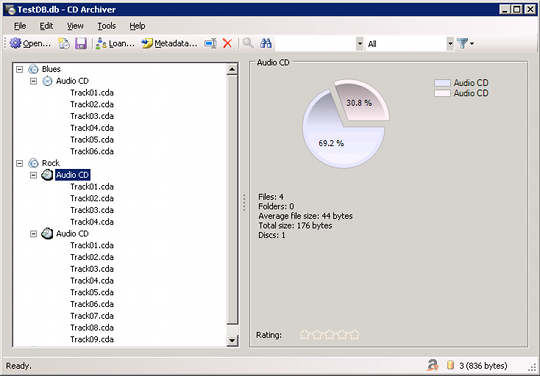
It's also a general purpose tool, rather than one designed specifically for keeping track of audio CDs. Because of this it lacks any tools to recognized audio CDs. Instead it tries to identify each track individually.
Since audio CD tracks can't provide information like artist and track names CD Archiver can't discover them automatically. In fact you have to manually enter everything about your CDs.
There are still circumstances where CD Archiver could be very useful. If, like me, you backup your CDs as data rather than audio discs, you should end up with files that have some type of tag (FLAC, APE, etc,...).
CD Archiver will recognize those files and save the informtion in its database. For the same reason it works great for cataloging discs of MP3 or AAC files. In fact it can recognize and read data from an impressive array of file types.
CD Archiver doesn't have a lot of extra features. Reports are very simple and not customizable. You can export CD details, but only for one disc at a time.
Rating from 1 - 10(higher numbers are better) | |
| Price | 10 |
| CD Recognition | 1 |
| Additional Features | 4 |
| Ease of Use | 1 |
| Customization | 1 |
There is a plugin interface you can take advantage of if your a programmer, but there aren't many plugins available now, and none of particular use for use with audio CD data.
If you have to have something free or want a tool to keep track of data discs as well as audio CD Archiver is worth a look. If you have a few bucks to spend and more than twenty or thirty audio CDs to catalog it's probably not the program for you.
Music Collector
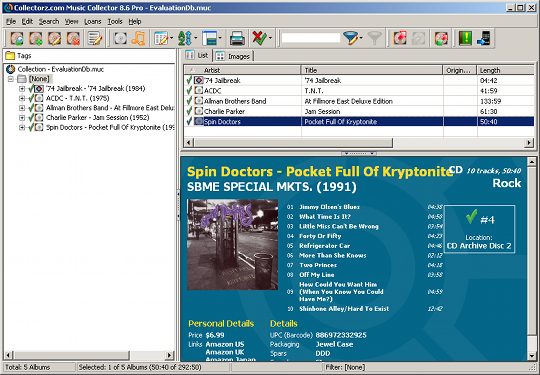
There are two versions of Music Collector. The Standard version costs $29.95 or you can get it by completing an offer through TrialPay.
CDs can easily be added by reading CD Text information from the disc, entering artist and title information manually, or looking up the barcode on the CD case. It also supports the use of barcode scanners, which they also sell for as little as $25 (including shipping) making the process about as quick and painless as it can be.
Amazon websites in the US, Canada, UK, Germany, France, and Japan can all be queried for details about each CD, and there's an online database of user submitted details that comes in handy when none of those sources return useful results.
The main screen's layout is similar to a typical email client. There are three available panes. They can be set to use the side, top, or bottom of the window. They can also be resized or even hidden completely.
You can also choose which fields show up in the CD list, choosing from more than 75 pieces of information possible for each disc.Similar options are available for printing a list of your CDs.
Of course not all that information can be downloaded from Amazon or the Music Collector central database. Fields like Studio and Recording date will need to be filled in manually if you want the information to show up. But they're completely optional.
For another $20 you can get the Pro version, which features some simple data analysis tools. This is where all those fields may come in handy. Assuming you've added the necessary information you could create a query to find out how many of your albums were produced by Bruce Botnick or feature Aynsley Dunbar on drums.
You can also export data in a variety of formats with Music Collector Pro, including HTML, XML, and plain text. If you have an iPhone or iPod Touch there's even a $9.99 app you can export to.
The next version of Music Collector, which is tentatively scheduled for release in October of this year, will add yet another feature. Or perhaps more accurately it will add features from another program called
Rating from 1 - 10(higher numbers are better) | |
| Price | 7 |
| CD Recognition | 9 |
| Additional Features | 9 |
| Ease of Use | 8 |
| Customization | 10 |
If you don't want to wait for the next version, MP3 Collector is already available from Collectorz.com. For $30 you can catalog your MP3, APE, WMA, OGG Vorbis, FLAC and WAV files and import the data into Music Collector so it can be combined with your CD data.
Music Collector is also the only one of the four with a Mac version.
OrangeCD Catalog
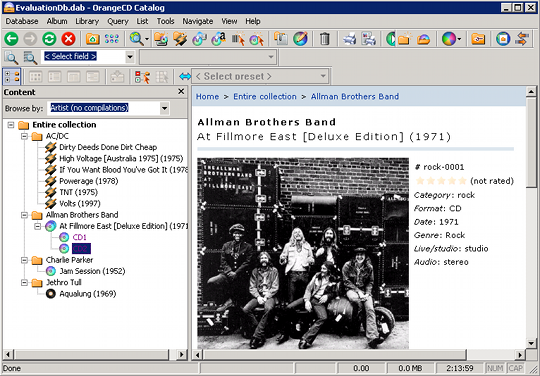
CDs can be added automatically from your CD-ROM drive, based on the barcode, or by doing a manual search of FreeDB or Amazon. The search feature is somewhat limited because your choices are Keyword, Artist or band, and UPC code.
The interface for the main screen is very similar to Music Collector, with 2-3 panes displayed. It also features a similar amount of information, with the option to select columns from a huge number of fields.
OrangeCD did have some problems finding the right artwork for some albums.
One advantage OrangeCD has over Music Collector is the price. There's only one version, and it costs $34.99. Aside from the iPod application it can do just about everything Music Collector Pro does.
It also adds some features of its own, like cataloging other music files without the aid of a second program. It can even read AAC (MP4) audio files; something Music Collector can't handle yet evem with the help of MP3 Collector.
OrangeCD is also a little more versatile when it comes to exports. In addition to standard formats like HTML, XML, and plain text, you
Rating from 1 - 10(higher numbers are better) | |
| Price | 8 |
| CD Recognition | 10 |
| Additional Features | 10 |
| Ease of Use | 7 |
| Customization | 9 |
Finally, you can export directly to an online service called Racks and Tags. It's a website where anyone can publish a listing of their music with others.
Aside from having a somewhat steeper learning curve and no iPhone app, OrangeCD is very similar to Music Collector Pro. With a pricetag that's $15 lower it's worth considering if you don't care about iPhone support.
CD Storage Master
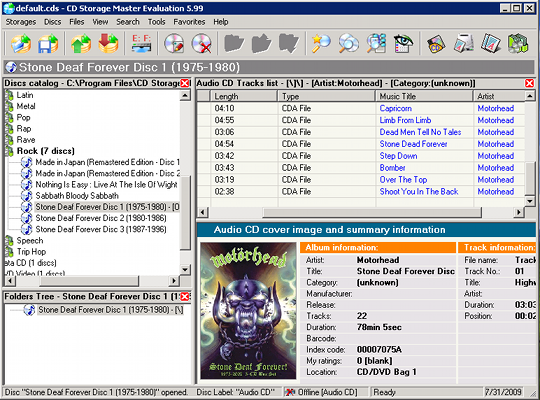
It also can't print a report to show you what discs you have. That's only available in the $59.99 Pro version.
Both versions support automatically adding discs by scanning them or entering a barcode, but there
Rating from 1 - 10(higher numbers are better) | |
| Price | 5 |
| CD Recognition | 10 |
| Additional Features | 7 |
| Ease of Use | 8 |
| Customization | 3 |
What CD Storage Master does have is the ability to catalog discs other than audio CDs. Like CD Archiver it can keep track of a wide variety of audio, video, and image files. If that's what you're looking for CD Storage Master may be a good choice.
If audio CDs are your focus you would probably be better off with either Music Collector or Orange CD Catalog.
Tags:
software




