
DVD Shrink v3.2.0.15

Freeware
Vista / Win10 / Win2k / Win7 / Win95 / Win98 / WinME / WinXP
Vista / Win10 / Win2k / Win7 / Win95 / Win98 / WinME / WinXP
DVD Shrink is a versatile freeware tool for fitting a DVD-Video disc on a single DVDR disc.
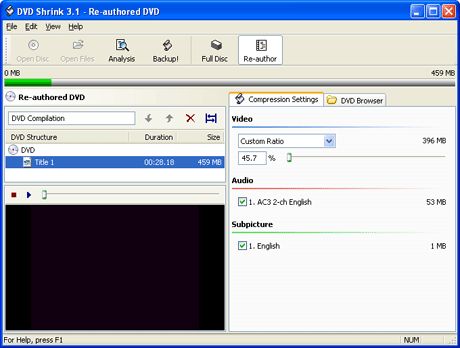
DVD Shrink is capable of both re-authoring and re-encoding the movie. It features an intuitive user interface which makes it easy to choose what to keep, and what to lose.
DVD Shrinks allow the user to select compression level for each video track separately to obtain the desired disc size (which is usually below 4.38GB). The software is capable of producing either an ISO image of the ripped DVD, or a VIDEO_TS folder for further processing, viewing or burning.
We recommend you read our fully instructional guide: How to copy DVDs with DVD Shrink!
DVD Shrink is capable of both re-authoring and re-encoding the movie. It features an intuitive user interface which makes it easy to choose what to keep, and what to lose.
DVD Shrinks allow the user to select compression level for each video track separately to obtain the desired disc size (which is usually below 4.38GB). The software is capable of producing either an ISO image of the ripped DVD, or a VIDEO_TS folder for further processing, viewing or burning.
We recommend you read our fully instructional guide: How to copy DVDs with DVD Shrink!
Screenshots:
HTML code for linking to this page:
Keywords:
dvd
shrink
fit
dvd-video
one
dvd-r
re-encode
License type
Freeware1
Author's homepage
Visit the author's site
Date added
02 Aug 2004
Downloads
25,379,553
File size
1.04 MB
(<1min @ 1Mbps)
Operating systems
Vista / Win10 / Win2k / Win7 / Win95 / Win98 / WinME / WinXP1
1License and operating system information is based on latest version of the software.



Some DVDs it will not accept. Gives message that file is encrypted.
But same DVDs are handled no problem by my old PC
Any suggestions please?
I would give it -stars but that not possible so had to give it a single one.
If people dont know how to work the more advanced programs they should use CloneDVD atleast thats still being updated once and a while.
I hope this is what Im looking for
Ron
Well done and, thanks.
Never had a problem using these to in conjunction.
DVD Shrink encountered an error and cannot continue.
Invalid DVD navigation structure.
Overlapped I/O operation is in progress.
What can I use to get around it??
Thanks
Has anybody tried shrink on Windows Vista?
As for the 3.2.0.15 vs. DVDShrink 2007 question. These both are one and the same.
For anyone that still is in doubt this is from DVDShrinks homepage: "We've been told some other sites/domains begin to sell/ask for donations for DVDShrink.
They even rename the latest official version (3.2.0.15)
to other names like DVDShrink 2007."
but if you use it with ripit4me(freeware)
every dvd is possible to backup ;)
I got fooled in *buying* the upfate "dvdshrink 2007"which was version 2. I complained and they gave me my money back - but they must be creaming it.
Idleman
Can we use this to rip and re-author WITHOUT RECOMPRESSING?
Even if that means copying a dual-layer disc to two single-layer blanks. So far it seems that every app assumes you want to recompress and wind up with crap.
To get around it use DVD Decrypter, RIPIT4ME and FFixVTS (all are freeware and come with 'idiot'-proof manuals).
Just tried it out with Pirates: Dead Man's Chest and works perfectly.
DVD Shrink encountered an error and cannot continue.
Programming error - exception occurred.
Anyone know how to get around this?
Most of the errors I get are during the writing phase on the blank dvd. Any help would be great.
Darren
Certainly worth checking out!
In answer to the question from REDCRX, no this software cannot shrink a dvd down to 700MB to burn to a CD.
If you want to do this, there are several methods, depending on how you intend to play back the end product.
I wont go into every detail here because it will fill the whole page, and you will find it all in the guides section anyway.
The first step, riping the DVD to your Hard disk is common to any method, but due to changes in the Finnish Copyright Laws i think all references to this may have been removed from the guides, and also the best software, DVD Decrypter has gone. Basically this means you will need to use DVD Shrink to get the movie off the disk and remove the copy protection.
If you want to watch your content on a standard dvd player you need to create a VCD or SVCD. see guides for converting DVD to VCD.
If you want to watch your content on a PC you will get the best quality out of an MPEG4 codec like DivX or Xvid. You could also watch this on MPEG4 capable DVD players. see guides for converting DVD to MPEG4.
However, compressing down to 700MB is going to give fairly mediocre results, i used to do it before i got a DVD burner, and will take a good few hours of processing time, and multiple pieces of software. If you can i would suggest investing £20 (or $35) in a dvd burner, and go ahead and use DVD Shrink.
5/5 - Excellent! Software, DO NOT hesitate to download your copy, right now!
It is a shame that it cant copy it but without a doubt this is the best dvd copying software on the market
What a nice experience.
The upgraded new one, it gotta be better than that.
sometimes it works sometimes it dont but, cant beat free
damn good program easy to use
5/5
Highly recommended.
Now sometimes fails
and it looks to be slower
KebD
If you don't have this program in your dvd copy arsenal, you are doing yourself a diservice.
The integration of DVDSHRINK with Nero is outstanding...copy, shrink and burn with one program.
ive read that some ppl are haveing problemswith it. ok
this is how to eliminate most problems when backing up dvd's. 1st make sure u DO NOT!! dasy chian the dvd burner/rom drive, it must be on its own ide chanel. make sure u use a hi quality cable (i recomend
a good round cable, them ribins just suck). 2nd make sure thir isnt any programs running in the background
(in windows just use msconfig and make sure u un tic load startup items and reboot). 3rd for them sony copy protected dvd's u must use a nother program called anydvd (new'er versons only), it will remove the sony protection. 4th use only name brand +/- dvd's. now burrning is up to you. some versons of nero,sonic record now and ez cddvd do not work right. i personaly use intervideo dvd copy, its specificly for book type dvd burrning, wich is what a dvd movie is. hope this helps :)
REALLY!
i've used it with all versions of nero and it still craps out. is there anything better?
-- beautiful copies ---
In and Out in less then 1/2 hr..
(depending on ur system of course ie:cpu-ram-ect--)
remeber yo disable sreensaver
What version 3.2 add from the previous version is the "still image" feature, which enable you to have the same image (that you can choose) shown for the whole duration of the movie part, leaving more Mb for the main movie.
Encoding takes the same time it did with version 3.1 for me...
JF
THE BEST DVD COMPRESSION SOFTWARE "KNOWN"!!!
One word to describe DVD Shrink v3.2.0.15: Brilliant!
I wasted money on a program and it turned out that the combination of the FREE DVD Shrink and DVD decrypter worked better than the program that I bought.
sam0254
Great, Fast Software. Excellent, The Best.
-Jesus is good-
love this program with DVD Decrypter. Does Shrink work OK with AnyDVD?
DVD X Copy.
Idleman
you need the newest vesrion of AnyDVD to burn Lords of Dog Town 5.4.4.1 is the newest version.
Finally hit a DVD that I can't backup using DVD Shrink and AnyDVD as support. The movie Lords of DogTown seems to have an invalid DVD navigation structure built-in. Is this something new or is there a program I could try
Keep up good work , ShrinkTeam !
Please make progress for that programm to be immune for all hindering process for burnning the DVD.
Best Wishes.
Keep up the good work.
very user frendley cristal clear movies number thanks
to everyone who made this possable keep updating.Not not all movies will burn using this software 5 ******
Thanks
thank
thank
thank
thank
thank
These are just a couple of the reasons I use this, in conjunction with DVD-Decrypter.
Now it seems that the official DVD-Shrink SITE is gone, but I have heard nothing about DVD Shrink being targeted by any Legal action.
Therefore: DOWNLOAD THIS NOW! It's free, and if you get it from Afterdawn, then you can be sure it is NOT coupled with a parasite program or hidden viruses.
Get this while you still can!
if you want to have alot of fun burning dvd that's
DVD Shrink's biz and it's for you. I have tryed others and this is the one, this program ROCKS.
In order to reduce DVD drive load I think it's better to provide an option to let user select HDD as input working area, if user's HDD have more working space, after inital analysis and load all content into HDD.
By this way, DVD drive can be relased and reduce its workload (lasting 3 hours or more, heat...).
encryption but just click the re-author button and it does it ok-so no problemo
make sure you don't use crap discs.
If all software were this good, we'd all be in a nicer place...
Björn Lundahl, Göteborg Sweden
Trex.
DVD shrink has been an excelent tool for ripping DVD's ,but its now not unable to rip the latest Disc's
or do i need to update the software??
I did research and tried to find a way to "back up" my dvds and then burn them. I could not find a way, and programs promised results but none worked. I took 3 trips to best buy trying to find a solution and I kept being told to buy nero. I didn't feel comfortable buying an $80 program not knowing if it would work. So I went to Office Max. They told me about DVD Shrink. I downloaded an older version and it didn't burn the information, it only backed it up to the hard drive. I tried more and more programs and even the demo version of nero (which will work but its ver complicated and time consuming), The demo expired and I didn't have the money to buy the software and I knew I could do it some other way. I went back and downloaded the newest version of DVD Shrink. It works great. It would scan the disk. I would click to burn and it would compress the information and burn automatically. It took about 20-30 mins (with a 16x burner)to burn a dvd. It is great software and best of all cheap. If you download the proper version of Shrink I promise that it will do everything that I just said it would. I am very pleased. It is legal too if you are "backing up." If you distribute the backup copies, you will face severe consiquences. I hope this is a better review.
Simon
Keep up the good work
2 thumbs up for sure!!!!!
full featured program !
2. User friendly interface
3. Outstanding results
I cannot say enough good things about this program. You simply must download it and experience what all the fuss is about. It really is an excellent tool for personal dvd replication.
Now, If the developer would just update this software to defeat the new Arccos/Puppetlock protection found on the current Sony dvds, this program would blow all the other dvd rippers out of the water.
Great work, great product! 2 thumbs up!
When is the next version?
Works fast on fast systems (like mine).
otherweise it is excellent for 5 DVDs
Anyhow you are waiting for the new version and we hope that it will be better
and free good for d/w
After trial of this last version 3.2.0.15 for the 9 DVDs it appears to be excellent for most of the DVDs but it needs a big time for the deep Analysis and the encoding then the burnning about 2-3.5 hours, it is successful for about 99% and 1% it can not read for which I used decrypter oder smart ripper then DVD Shrink for the compression.
Anyhow my deep congratulations for the staff of developers
eloraby, 17.11.2004
4,7 GByte (= 4,463), but for the compression of 7 or 8 or more Gbytes, the quality is less and movements come somtimes to stillstand, I tried the last version for the good quality but it did not work, I hope that you will achieve a big sucess in the newly developed versions
Accept my deep Congratulations
eloraby 19.10.2004
Dual layer is supported in this version, just changed target disk size.
TRIED ALL THE REST.
USE SHRINK AND NERO.
There seems to be a little confusion with some people, DVD shrink (ignore the name it does more than shrink) enables anyone to back up a dvd any way they wish, FULL back up or RE-Author. I use RE-Author alot as I feel alot of the extras on some dvds are crap I backup the dvd with just the movie.
This is by far the easiest program I have ever used for what it does and of course it is free. Also note that they update often which is rare in a "adware/spyware clean" "free" program.
You want to backup your dvds no matter what your skill level? GET THIS PROGRAM! (uses Nero very well)
There seems to be a little confusion with some people, DVD shrink (ignore the name it does more than shrink) enables anyone to back up a dvd any way they wish, FULL back up or RE-Author. I use RE-Author alot as I feel alot of the extras on some dvds are crap I backup the dvd with just the movie.
This is by far the easiest program I have ever used for what it does and of course it is free. Also note that they update often which is rare in a "adware/spyware clean" "free" program.
You want to backup your dvds no matter what your skill level? GET THIS PROGRAM! (uses Nero very well)
Thank you
BUT one of the new features "Quality Settings", be careful with it. Only use it if you have to shrink beyond 55%
This(and NERO)is all you need.
I wish I new this a year ago....
Can't wait for dual-layer support!!!
Kudos to the people behind DVD Shrink
This software is good but it needs further development to be optimal, but really it is good
eloraby, 03.2.2004
THANKS DVD SHRINK AND DVD DECRYPTER YOUR THE BEST
Continuem assim e muito obrigado por me darem a chance de ter um programa como o DVD SHRINK.
Thanks.
E.Cabral
Truly an excellent piece of software.
Thank You
When I use something this good I want to reward the writer.
I have used cce+rebuilder for a while and I can say that it is "the donkey's danglers".
I haven't used it yet but in the change log it states "target for dvd-9 added".
Why is this needed if the point of shrink is to bypass the need for DL discs????, why not Dvddecrypt to the HD then burn with nero???? But anyway...
This might sound facetious, if so, sorry, as i know the author is doing great work, all for FREE. This must always be taken in to account.
Thanks for this long awaited software, and good work!
copies of a DVD,and it's free! I've used it for over a year,it just keeps getting better. I use Shrink and DVD Decrypter for all my back-ups.
The options and menus are easy to understand and to get used to, especially with help from Afterdawn.com. And as V. Canfield says it isn't cluttered by simpleton menus and restricted options. One can customise the ripping method quite freely. It isn't as problematic as the commercial ones, like DVD CLoner 2 and others.
This is free, and as the saying goes, the best things in life are free!
Kudos to the makers and to Afterdawn.com, this site is an awesome site!
I've ditched all my other copying / reauthoring software for this pair - top results the first time and every time since.
Afterdawn.com - Awesomer!
I just happened to stumble accross this site a few months ago. Love it!
First open the disc(this will take a min or two)
then look at all the settings or you could just not mess with it.
Then hit back up and look at the options. I save to hard drive and burn with nero. Make sure you know where it is saved to.
It will only make video_ts folder which you drop in the nero after get it to the dvd video section stuff yeah. So yeah have fun.
JP
i have had no sucess what so ever with shrink dvd it IS long and protracted compared with dvd copy. of course,xpress is now illeagle.
i would like some help with this shrink dvd so i can go foward with it. thanks. 7.62rks@cox-internet.cox
V.Canfield