
 Options abound for users of seized or blocked websites.
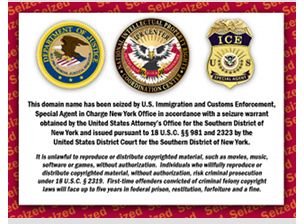
The U.S. Immigration and Customs Enforcement (ICE) started seizing domains last year, targeting BitTorrent websites and other sites that it linked to copyright infringement. The Stop Online Piracy Act and PROTECT IP legislation being debated in the United States also contain measures for taking out such websites.
In the UK, the largest ISP in the region, BT, has been ordered to block access to Newzbin2, a Usenet indexing website. Users of these sites are obviously outraged at the actions taken by authorities, and consumer rights / digital rights groups oppose the methods being used.
DNS blocking (hijacking) in particular has come under immense scrutiny. Public Knowledge has argued that DNS blocking creates conflicts between DNS servers on the Internet, make the system less secure and create potential for identity theft. ICE-seized domains use this method, where DNS servers direct users to the wrong web server, where they get a nice message from ICE.
In most cases, the website in question is still online and operating and anyone who has the right IP address can access it easily. For those that don't, there are some solutions to the problem.
BlockAID is a public DNS service setup in response to domain seizures (also known as PeerDNS.) Using BlockAID means you will not be prevented from accessing a domain after it has been "seized," in the same way you would be if you were sticking to the DNS servers used by your Internet Service Provider (ISP), OpenDNS or Google's DNS servers.
BlockAID keeps a database of blocked websites and when a user tries to reach one, it sends them on the correct path instead of the new one mandated by ICE. It doesn't detect blocked sites automatically but can add any site to its database once it is made aware of the problem.
Read a guide here on setting up BlockAID on your computer
Some solutions have also become available for browsers. MAFIAAFire has released a aptly named Add-On for Firefox called "ThePirateBay Dancing!" that tries to overcome the problem by "sending some of your requests (that you choose) to particular sites via a proxy." The version available now is just a proof of concept however.
Check if out if you are a Firefox user at: addons.mozilla.org
In the UK, the largest ISP in the region, BT, has been ordered to block access to Newzbin2, a Usenet indexing website. Users of these sites are obviously outraged at the actions taken by authorities, and consumer rights / digital rights groups oppose the methods being used.
DNS blocking (hijacking) in particular has come under immense scrutiny. Public Knowledge has argued that DNS blocking creates conflicts between DNS servers on the Internet, make the system less secure and create potential for identity theft. ICE-seized domains use this method, where DNS servers direct users to the wrong web server, where they get a nice message from ICE.
In most cases, the website in question is still online and operating and anyone who has the right IP address can access it easily. For those that don't, there are some solutions to the problem.
Using BlockAID DNS
BlockAID is a public DNS service setup in response to domain seizures (also known as PeerDNS.) Using BlockAID means you will not be prevented from accessing a domain after it has been "seized," in the same way you would be if you were sticking to the DNS servers used by your Internet Service Provider (ISP), OpenDNS or Google's DNS servers.
BlockAID keeps a database of blocked websites and when a user tries to reach one, it sends them on the correct path instead of the new one mandated by ICE. It doesn't detect blocked sites automatically but can add any site to its database once it is made aware of the problem.
Read a guide here on setting up BlockAID on your computer
Browser Add-On
Some solutions have also become available for browsers. MAFIAAFire has released a aptly named Add-On for Firefox called "ThePirateBay Dancing!" that tries to overcome the problem by "sending some of your requests (that you choose) to particular sites via a proxy." The version available now is just a proof of concept however.
Check if out if you are a Firefox user at: addons.mozilla.org
Tags:
BlockAID




