
GOP Settings
A simple GOP may contain nothing but I frames, but since it's a display format, and not generally edited after encoding, it's inefficient to stick to I frames alone. Generally a GOP actually has an I frame followed by one or more B frames, followed by a succession of P and B frames. A pattern of I, P, and B frames may repeat multiple times within a single GOP, but normally a new GOP is started at each I frame. GOPs are normally set to be no shorter than about half a second, although scene detection can shorten GOPs.
GOP structure
You can use the buttons labeled I Pictures Only, I, P Pictures Only, and I,P,B Standard to set which types of frames will be used for encoding. I, P, B Standard should almost always be used. Above that is a field to enter the maximum number of fields per GOP. This may be a number determined by your destination format, or may be determined by other considerations, such as a number of GOPs per second.I Frames
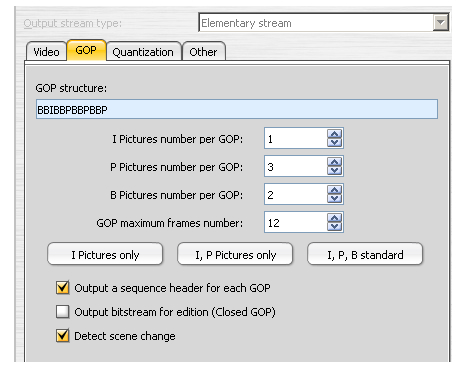 Normally I frames should be set to 1 because you'll rarely have enough frames in a GOP to justfiy a second I frame.
P Frames
If you're setting your GOP to be approximately half a second long you'll want to use 3 P frames if your video is in PAL format or it's progressive film that will have pulldown flags added for NTSC playback. For actual NTSC video playing at 29.97fps (NTSC) you'd need to set P frames to 4. If you're not encoding with B frames that would increase to 11 and 14.B Frames
The number for B frames works a little differently because it's the number repeated after each I and P frame. Setting it to 2 with a single I frame and 3 P frames would give a GOP structure of IBBPBBPBBPBB for PAL or film, while settings of 1 I frame, 4 P frames, and 2 B frames results in IBBPBBPBBPBBPBB for NTSC video.Other GOP Settings
Output Sequence Header for Each GOP should normally be checked, Output Bitstream for Edition (Closed GOP) should usually be unchecked. It limits the frames that can be used for prediction to the current GOP, reducing quality slightly in some cases. Detect Scene Change allows TMPGEnc XPress to determine when a frame is so different from the previous one that a new I frame is warranted. I frames should normally be used for new scenes to avoid compression artifacts, so this should be checked.


