

User User name Password  
   
Wednesday 8.10.2008 / 01:40 AM
Search:        In English   Suomeksi   På svenska
afterdawn.com > news > new convert flac to mp3 guide
Show topics
News
News

New convert FLAC to MP3 guide

5 August 2007 22:09 by Dave "Davedough" Horvath | 24 comments

New convert FLAC to MP3 guide Have you ever spent the time obtaining an album that you sought after, only to find out that the files are all in FLAC format?(click here for instructions on how to play FLAC directly without converting). FLAC is a fine format, until you realize you can't play it in your hungry iPod. This article will allow you to successfully convert FLAC files to a standard, high-quality MP3 files using free software you probably already have.

FLAC to MP3 Guide

If you want information on how to play FLAC files on your computer (Windows, Linux, Mac), then check out the following guide...

How to play FLAC files


Get regular news updates from AfterDawn.com by subscribing to our RSS feeds using the Subscribe button below. If you have been living in a cave for a few years now and don't know how to use RSS feeds, then Click Here to read a Guide on how to use RSS (and other) feeds.
Permalink to this article

Get AfterDawn's news to your favourite feed reader! Share this story with your friends!


Related articles:

  • Third guide in new series available (23 August 2007)
  • Second installement of DVD Project added (21 August 2007)
  • New guide series on Afterdawn (15 August 2007)
  • Audio Watermarking may be new alternative to DRM (15 August 2007)
  • Allofmp3 case thrown out of Russian court (15 August 2007)
  •  

    « Previous news article
    16GB flash iPod video coming?
    Next news article »
    Nokia enters DRM talks with Microsoft
     Post your comment
    Discuss this article! 
    thekingo7 (Senior Member) 5 August 2007 22:37 Send private message to this user   
    Excellent little guide. Well done.
    Pride1 (Member) 5 August 2007 23:02 Send private message to this user   
    Gotta love afterdawn.com

    Very useful, Thanks

    This message has been edited since posting. Last time this message was edited on 5 August 2007 23:03

    hikaricor (Newbie) 5 August 2007 23:44 Send private message to this user   
    ....
    Teng (Newbie) 5 August 2007 23:54 Send private message to this user   
    Thank you very much. Nice guide.
    Very useful.
    vinny13 (Inactive) 6 August 2007 5:30 Send private message to this user   
    Never seen or heard of FLAC before :S
    Jondrew (Member) 6 August 2007 6:09 Send private message to this user   
    flac is a lossless format, it loses no quality from the original cd... you find it on a few d/l sites now... i like it.
    chubbyInc (Member) 6 August 2007 7:44 Send private message to this user   
    I've always used dBpowerAMP for converting FLAC to MP3, but I'll keep this way in mind.
    PeaInAPod (AfterDawn Addict) 6 August 2007 9:23 Send private message to this user   
    This is great! I just downloaded a flac version of DJ Danger Mouse's "Grey Album" and wanted to convert it to a mp3. Will keep the flac version of course though :).

    This message has been edited since posting. Last time this message was edited on 6 August 2007 11:42

    plazma247 (Newbie) 6 August 2007 10:19 Send private message to this user   
    There is flac support in winamp if you install this:

    http://www.winamp.com/plugins/details/131643

    Then you can either play them in winamp or just use the disk writer plugin to stick em back to mp3 :)

    As a note on flac if your looking at loss less audio have a look c at monkey audio.

    http://www.monkeysaudio.com/

    I used to favour it over flac :)
    mbonner (Newbie) 10 August 2007 3:13 Send private message to this user   
    I've been using programs called "Magical Jelly Bean" and "Switch" for all of my audio conversions. "MJB" does SHN and FLAC conversions very efficiently......a quick and easy 4-step process that takes about 5 minutes, if that. I use "Switch" mostly for converting OGG format to MP3, and I believe it also does FLAC but not SHN. Use any search engine to find these freeware programs online. Peace.............
    borhan9 (AfterDawn Addict) 13 August 2007 13:49 Send private message to this user   
    Another great essential guide done by Afterdawn. Great job well done.
    Unfocused (Junior Member) 14 August 2007 21:57 Send private message to this user   
    Good old AfterDawn. Always there for us.
    kmitch (Newbie) 13 February 2008 21:36 Send private message to this user   
    I've just built a vbscript that is a front end for the command line tools that will allow reflacing your files, decoding FLAC to WAV, Encoding WAV to FLAC, or converting FLAC to MP3. You can also use this to synchronize your FLAC library to MP3.

    The script and instructions are available here:

    http://code.google.com/p/reflacer/
    snooperz (Newbie) 2 May 2008 23:53 Send private message to this user   
    I followed your guide, and it worked without a hitch. I'm just beginning to d/l torrent, and have found many file in FLAC, somewhat disappointed at first since my MP3 player and Itunes didn't know what they were. Now in MP3 format, and all is well in the world. Kept the originals too. Nice lossless backup. Thanks
    Moriem (Newbie) 15 May 2008 4:36 Send private message to this user   
    Here is another nice guide that works.
    7thsinger (AfterDawn Addict) 15 May 2008 9:45 Send private message to this user   
    Nice guide. Well put together. Thanks!
    Randizzl (Newbie) 30 May 2008 20:40 Send private message to this user   
    Hey, I followed this tutorial just fine, and found that it did just as it said.

    My only problem is now I can't get winamp to play files. I know this seems dumb, but how do i get it to play now instead of just convert? Everytime I press play, it just makes the .wav files.

    Any help?
    Randizzl (Newbie) 31 May 2008 23:46 Send private message to this user   
    Originally posted by Randizzl:
    Hey, I followed this tutorial just fine, and found that it did just as it said.

    My only problem is now I can't get winamp to play files. I know this seems dumb, but how do i get it to play now instead of just convert? Everytime I press play, it just makes the .wav files.

    Any help?
    Well, after enough screwing around I found out that the fix for this is incredibly simple. In the plugins section under output, I had to change it back to "direct sound".

    So this tutorial being geared toward totals novices is flawed in that it requires more than one application, and it doesn't instruct on reversing its steps. So good, but not perfect.

    It got me going down the right path, and hopefully my noobness and comment helps someone.
    Jollygod (Junior Member) 6 July 2008 13:35 Send private message to this user   
    This guide is useless if you don't have "Nullsoft Disk Writer plug-in" on your WinAmp. I made a search for that plugin at WinAmp's website and didn't find anything.. So Please update this guide to include instructions what to do if there's no such plugin. This is so frustrating..
    And, I don't want to download any kind of shareware conversion software that can convert one file at at time and can't even save it. I know there's plenty of those...
    plazma247 (Newbie) 8 July 2008 10:19 Send private message to this user   
    Originally posted by Jollygod:
    This guide is useless if you don't have "Nullsoft Disk Writer plug-in" on your WinAmp.
    Errrm chap its built in since well about the last 6 years.

    Basically open winamp

    --> Options --> Prefrences --> Output

    Select the disk writer, you might want to check the configure options are right for what your outputting to, ie mp3/wav/samplerate etc.

    Also once your done remember to select it back to direct sound or you will wonder what happened to all your audio later on ;)

    Hope that helps :)
    dipsuck (Newbie) 30 August 2008 12:58 Send private message to this user   
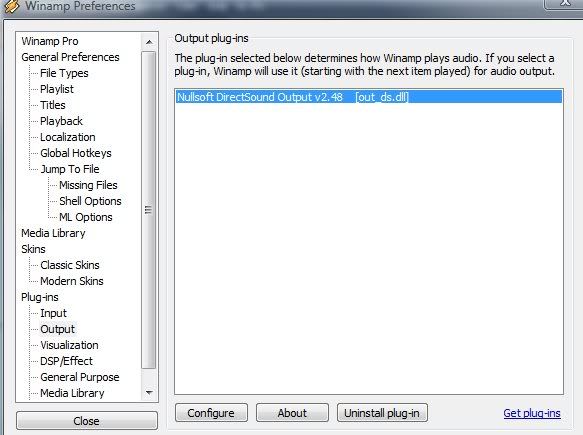
    Um...I don't seem to have the disk writer plugin and I just downloaded the free version a moment ago.

    all I see is this:


    Can someone tell me why it's not there? I know it's supposed to be, but it simply is not.
    Jollygod (Junior Member) 31 August 2008 12:37 Send private message to this user   
    That's what I was talking about...
    plazma247 (Newbie) 12 September 2008 6:50 Send private message to this user   
    Originally posted by Jollygod:
    That's what I was talking about...
    Ok ive just actually reloaded my main machine, just downloaded winamp from:

    http://download.nullsoft.com/winamp/clie...7plus_en-us.exe

    and went to:

    options --> prefrences --> output

    I have disk writer, direct sound and wave out.

    I can only assume you downloaded a cut down version and not winamp full
    dipsuck (Newbie) 12 September 2008 15:04 Send private message to this user   
    Thanks Plazma,
    That did the trick, of course I always gravitate towards whatever option makes life more difficult for me. Does it make any difference that I haven't used Winamp in over 5 years?
    No?
    I'm still a n00b?
    I tried....

    Thanks again, props to you bro...
     Post your comment
     

    Subscribe to our newsfeed

    Get the latest headlines delivered directly to your favourite RSS reader or content aggregation service by using the links below.

    AfterDawn.com: News - RSS feed
    Add to Google
    Add to My Yahoo!
    Add to MyMSN

    Search for headlines

    Search through our news archive.

    Last week's most popular software downloads

    Digital video: AfterDawn.com | AfterDawn Forums | DVD X Copy Forums
    Music: MP3Lizard.com
    Gaming: Blasteroids.com | Blasteroids Forums
    Software: Software downloads
    Blogs: User profile pages
    RSS feeds: AfterDawn.com News | Software updates | AfterDawn Forums
    International: AfterDawn in Finnish | AfterDawn in Swedish | download.fi | fin.MP3Lizard.com
    Navigate: Search | Site map
    About us: About AfterDawn Ltd | Advertise on our sites | Rules, Restrictions, Legal disclaimer & Privacy policy
    Contact us: Send feedback | Contact our media sales team
     
      © 1999-2008 by AfterDawn Ltd.

