Anandtech first published and then pulled a rather sensationalist article which slandered processing power of the next generation gaming consoles of Sony and Microsoft. The article suggested that Anandtech had discussed with developers who had been in touch with the hardware, and therefore had first hand information. According to their sources the designs are cache crippled and exotic.
The most ironic bit of it all is that according to developers, if either manufacturer had decided to use an Athlon 64 or a Pentium D in their next-gen console, they would be significantly ahead of the competition in terms of CPU performance.
While the developers we've spoken to agree that heavily multithreaded game engines are the future, that future won't really take form for another 3 - 5 years. Even Microsoft admitted to us that all developers are focusing on having, at most, one or two threads of execution for the game engine itself - not the four or six threads that the Xbox 360 was designed for... In the end, the more multithreaded nature of these new console CPUs doesn't help paint much of a brighter performance picture - multithreaded or not, game developers are not pleased with the performance of these CPUs.
While the original article has been removed, some of it is available at Arstechnica
It is being reported on some news sites that some raids took place today against Internet "warez" groups. It has been confirmed so far that there was at least one arrest against a Fremont man. Chirayu Patel, 24, was arrested yesterday accused of setting up hardware and running a site for a group called Boozers; who are famous online for releasing pirated DVDR copies of movies. Apparently the FBI unmasked a number of piracy groups by making massive amounts of storage space available to them.
On these 2 servers provided by the FBI and 2 servers provided by "warez group members", 27TB of data appeared including movies like Star Wars Episode III: Revenge of the Sith just hours after their first theatre showings. Patel is alleged to have become a "Site Op" who used one of the undercover servers and uploaded loads of video games, architectural software and movies.
While now there are only a couple of news sources writing about it, the rumours have been buzzing around the Internet all morning with some details reaching us slowly. Apparently, raids were also targeted against the leaders of groups Centropy and TDA. Some other details that have come this way include the apparent nickname of one federal agent involved - Griffen.
Apple has announced that it has merged the iPod with the iPod Photo, making way for a new line of iPod players that have colour screens and the ability to view album art work, photos and slide shows aswell as listening to music. The announcement came at the same time that Apple added podcasts to the iTunes music store which can be downloaded for free.
The new iPod product line will include a 20GB model which will retail at $299 and a 60GB model that will retail for $399. Previously the company had normal iPod devices, and iPod Photo's which were more expensive due to their colour screen and photo displaying support. Increased battery life has also been added to the new players.
The older 20GB model was priced at $299 whereas the older 60GB model was priced at $499. A 30GB iPod model was dropped completely. Along with the announcement of the new iPod line, Apple also announced that it was cutting an extra $20 off the price of the iPod Shuffle device which isn't a HDD-based player; it uses flash memory and as a result can store less music.
Then latest version of the iTunes music store now gives customers free access to podcasts. It has created a directory of shows on its iTunes music store and so far is providing about 3,000 shows; a move which the company claims "brings podcasting into the main stream". The updated software also allows users to send in their podcasts, but of course each will be checked first by Apple to make sure there will be no copyright problems.
Podcasts are downloadable audio shows that anyone with the right equipment could produce or download. They have become popular due to the fact that they are an easy way of getting digital content and listening to it where and when you want. Basically anyone with a computer, microphone, some extra software and access to the Internet can create a podcast. The rising popularity has come into the attention of many radio stations, and as a result, some, like the BBC for example, are making shows available as downloadable MP3.
"This is really going to drive podcasting to the next level," said Stan Ng, director of iPod worldwide marketing. "We really are embracing podcasting, making it easy for people to manage, listen and subscribe to podcasts." You can get access to podcasts through Apple's music store where about 3,000 are currently available. "We've tried to include as many as possible," said Mr Ng. The content is not only checked first for copyright issues, but also for objectionable content.
According to Merrill Lynch Japan, Sony might lose over $1 billion on hardware during the Playstation 3's first year. In the latest edition of Toyo Keizai, a Japanese magazine, Merrill Lynch Japan Securities calculated the product cost of a PS3 to be around 54,000 yen ($494), as of its initial release in 2006. The main components of the machine, including the Cell chip, RSX, and BD-ROM drive will come to a price of 11,000 yen ($101) each.
However, it is highly unlikely that Sony would release the console at its production cost due to the competition it is facing with Microsoft's XBOX 360 console which will sell for $299. Merrill Lynch Japan predicts that Sony will initially sell the PS3 console for $399 in America and 44,800 yen ($410) in Japan. If those figures turn out to be accurate, that means Sony will make a loss of 130 billion yen ($1.18 billion) in the first year.
However it is normal for a company to make take hardware losses when they launch a new console as the first year is dedicated to market share more than making a profit. In 2000, Sony launched the Playstation 2 console for $299 in America and 39,800 yen ($364) in Japan and suffered a 51.1 billion yen ($458 million) loss. However in the second year the company made a profit of 82.9 billion yen ($759 million) and 112.6 billion yen ($1.03 billion) in the third year.
Jon Lech Johansen, or "DVD Jon", has released a patch that will allow users of Google Video Viewer to play videos that are not hosted on Google's servers. Google has Limited the player to videos from the Google servers only, which can be seen here...
You can find a link to the patch on Johansen's Blog. Using the patch requires the .NET framework which can be downloaded from Microsoft's homepage. The source code is now also available on the blog. Of course this patch has been completely misunderstood by many news websites who are reporting Johansen has "cracked Google's video security". Actually Google has made public the changes applied to the VideoLAN client, on which the Google Video client is based on. Therefore the patch is quite trivial, and should not be compared to, for example, Johansen's work with CSS and iTunes.
Just two days after the U.S. Supreme Court ruled that the owners of filesharing networks can be held liable under circumstances for the copyright infringement taking place by users using the software, Sony BMG has inked a deal with a P2P firm, Mashboxx. Wayne Rosso, former president of Grokster, heads the Mashboxx project, which is a filesharing network that will require music sharers to pay for their downloads. A Sony BMG song would cost 99c on the service just like iTunes.
However, one major difference to iTunes is that Mashboxx will allow users to preview tracks a number of times before they pay to keep them permanently. Mashboxx uses technology called Snocap, created by Napster founder Shawn Fanning. Snocap can identify songs using a digital fingerprint and determine whether they are copyrighted or not. Although services like Mashboxx still have competition with other "unauthorised" P2P networks, the Supreme Court did the legal services a favour on Monday with its ruling.
Sony BMG CEO Andy Lack hopes the Grokster ruling will encourage owners of other P2P services to incorporate technology like Snocap so that users will be charged for their music downloads. "There's an opportunity to employ lots of different technologies that legitimize these file-sharing services," he said. "A lot of them didn't want to come to the table until this ruling." All four major record labels currently have deals with Snocap, and negotiations are on-going with some Independents.
It is official that the Xbox360 will initially ship with a regular DVD drive, while Sony PlayStation 3 is about to adopt next generation Blu-ray format from the start. Recently there has been some talks and a lot of speculation about the united future of HD-DVD and Blu-ray.
While the talks are still going on, Microsoft has decided to takes sides. Even though Xbox360 will ship with plain old DVD, they are looking to support in the future.
Bill Gates’ statement that Microsoft is studying the possibility of adopting the HD-DVD for its Xbox 360 is surely very flattering for Toshiba, but in the same time it could jeopardize the gaming console’s sales.
The new console from Microsoft, awaited by the gamers with more interest than the winter holidays (when the launch date is set), could experience a sales fiasco if the fans decide to wait for the HD-DVD model.
Yesterday the Supreme Court ruled that P2P companies who promote the use of their product for piracy could be sued but the ruling confused most of the media and set the ruling as a complete victory over P2P by the entertainment industry. While the ruling is a bit of a blow to future technological innovation, StreamCast CEO Michael Weiss doesn’t appear too worried yet as he speaks to p2pnet about the decision.
p2pnet: On a scale of 1 to 10, how serious is this ruling from StreamCast's perspective?
Weiss: Any decision by the Supreme Court has to be given a 10.
p2pnet: Does it, then, spell the end of Morpheus?
Weiss: No! Today's decision to send the case back to the lower federal court on remand was expected by most parties. However, the media seems to have totally mischaracterized the decision as a loss for us and a win for the entertainment industry.
p2pnet: Just after the decision came down, StreamCast general counsel, Matthew Neco, said, "In every instance where some product might possibly be used for copyright infringement, the copyright holder can now sue and weigh down innovation with expensive, time and resource consuming discovery and trials."
Overturning an earlier decision, an Australian federal court has ruled that two Swiftel sysadmins can be sued by the music industry for alleged music piracy. The Perth based ISP has been accused of copyright infringement by major record labels who claim some of their employees and customers setup a BitTorrent hub which "hosted" thousands of pirated music files. The allegation that it actually hosted pirated files is strange considering that’s not usually how a BitTorrent site would act – it would host torrent files, not pirated files.
In fact, some people are claiming that the Music Industry Piracy Investigations (MIPI) claims are false and that it was a DC (Direct Connect) hub and had nothing to do with BitTorrent. Nevertheless, sysadmins Melissa Ong and Ryan Briggs allegedly ignored attempted contact by the labels and "treated the warnings as spam". Back in April, magistrate Rolf Driver refused to allow the pair to be added as respondents, citing lack of evidence that they acted any way beyond the scope of their employment.
Outside of Japan, DVD-RAM is generally ignored by the DVD enthusiast community. However, projections from Semico Research are showing a bright future for the DVD-RAM format which now finally starting to gain some popularity on the U.S. market which has been a slow market for the format thus far. Semico Research projected that shipments of DVD recordable devices will reach 23 million devices in 2005, and increase to 90 million in 2009.
The reason for the growth has been credited to lower prices, better features and products becoming more user-friendly. "While DVD-RAM compatible devices, in both DVD set top recorders and DVD PC drives enjoy wide success and support in Japan, the United States is slowly catching up, both in terms of DVD recorder penetration and DVD - PC drive configurations," said Tony Jasionowski, Executive Director for the DVD-RAM Promotions Group.
In Japan, DVD camcorders have been very successful and consumers like the option of recording to dual-sided DVD-RAM discs, which can then be transferred directly to a consumer electronics-based DVD recorder for playback on a TV or to a computer for editing. 400,000 DVD camcorders shipped in 2003, followed by 1.1 million in 2004 and now over 3 million are expected to have been shipped by the end of 2005.
Microsoft and Toshiba have announced that both companies will strengthen joint development of consumer electronics goods and consider working together on HD-DVD players that will play one of the competing formats for the next generation format of DVDs. Both companies have been working together for years now. Toshiba is the third largest notebook PC maker in the world. Both companies reached an agreement back in May that would allow each company to use the others patents on computer and digital electronics technology.
Both companies are now considering working together on making HD-DVD players that would run on Windows software; a move that could bring down the development costs for the players, Toshiba hopes. "We think the agreement will have practical benefits such as lower costs and shorter development times," Toshiba President Atsutoshi Nishida said at a news conference in Tokyo. Bill Gates was also in attendance at the conference.
Toshiba hopes to be able to provide HD-DVD players for the Japanese and U.S. markets by the last quarter of 2005 which would play back the HD-DVD format backed by Toshiba. Sony Corp. is supporting the Blu-Ray Disc format, which stores higher capacity than HD-DVD (HD-DVD holds about 30GB, whereas Blu-Ray holds about 50GB). However, the HD-DVD camp claims that their format will be a much cheaper option for the entertainment and software industries to adopt.
The CDR-Zone has published an interesting media review of the Verbatim 4x DVD-R DL disc. Based on this review it seems that Mitsubishi and Verbatim have been able to maintain their excellent quality. Here is a quote from the conclusions of the review:
The reported Pi Error and PI Failure results in our Quality tests section showed very low error levels with generally very good beta/Jitter/TA and peak shifts results at a 4x recording speed. The exception to this was the Liteon 1693S with firmware KS04 which seemed to have very even beta although this disc was perfectly playable in our DVD standalone players capable of reading this media.
Most of our review recording devices saw the Verbatim 4x DVD-R Dual Layer media as having a maximum recording speed of 6x and we hope to bring you some overspeeding results via our Media forum as we manage to source some more pieces. Judging by the very good Quality tests results we are happy to predict that 6x recording should not be an issue for this media on any of the drives supporting 6x recording.
In a major blow to technological innovation today, the U.S. Supreme Court ruled in favour of Metro-Goldwyn-Mayer in a huge P2P case. Since the case began in March, Justices showed concerns over holding the inventors liable for copyright infringement as they believed it could discourage new inventions, but obviously their minds were changed as the ruling was passed unanimously today. However, it't not all the entertainment industry hoped for and Grokster and Morpheus remain complete legal software.
The entertainment companies accused Grokster and StreamCast Networks (which owns the Morpheus P2P software) of promoting their products to be used for piracy and it seems it was enough to convince the court to partially set-aside an older appeals court ruling in favour of Grokster and StreamCast. "We hold that one who distributes a device with the object of promoting its use to infringe copyright, as shown by clear expression or other affirmative steps taken to foster infringement, is liable for the resulting acts of infringement by third parties."Justice David Souter wrote for the court.
Case History
Now we’ll take a look at how this P2P case ended up in the Supreme Court in the first place.
Major record labels are starting to see some high revenue from the sales of ringtones to mobile phone users. These "real sound" ringtones, playback usually only for about 15 seconds but the company that sells them could charge easily 3 or 4 times as much as iTunes would charge to download a full music track to a computer. Major record labels are now seeing ringtones as a new "piracy free" source of revenue that could help fix any damage cause buy lost sales due to rising rates of piracy around the world.
"This is not a fad that will go away in the next year or so," said Thomas Hesse, president of global digital business at Sony BMG Music Entertainment. Of course it won’t go away; people will always be looking for tones to be played when they are receiving incoming calls. However, up until recently, phones could only handle polyphonic and monophonic ringtones at best, but compared to real audio (or what the industry refers to as "master tones") they sound pretty dead and lifeless.
"We knew it was an area of revenue that had record companies excited, but I don't think we were really prepared for the dimension of success we were seeing," said Geoff Mayfield, Billboard senior analyst and charts editor. Billboard launched a sales chart for ringtones last October. In many cases now, ringtones are outselling download sales. For example, "My Goodies" by R&B singer Ciara has already been sold as a ringtone over 1 million times.
Sony has dismissed many rumours started by British news sources that the company is requesting customer information from online sellers to try to track and confiscate PSP (Playstation Portable) devices sold to the United Kingdom before September 1st, when the device is due to be released in Europe. The company has launched its own battle against retailers in the UK that are importing PSP devices from Japan and the United States where it has already been on sale for months.
"We are fully aware of the gray market situation and we are trying to address the problem," Sony's president of consumer sales, Stan Glasgow, told CNET News.com, "but I seriously doubt that Sony would pursue any criminal action against individuals. It's just something that we wouldn't do." Meanwhile some retailers in the UK are ignoring threats by Sony, saying that they are simply selling the PSP which is more than Sony has done for UK customers. The European launch of the PSP console was delayed by months so that enough PSPs would be available for the U.S. market.
The company is going to court on Monday to ask for an injunction against companies that are selling the PSP and accessories early. Sony has also issued about 600 letters to individuals and companies telling them to stop selling PSPs on eBay. Customers in the UK have shown they are willing to pay extra for the console than it's worth. Originally Sony's battle against these sales shocked many companies, as the company never really had a problem with importing in the past.
An Indian Researcher, Debasis Mohanty has beaten what Microsoft called its "impenetrable"Windows Genuine Advantage. Windows Genuine Advantage is designed to keep tabs on consumers determining whether they are running a legit copy of Windows or a pirated copy. If running a pirated copy, a consumer may be restricted from downloading software from Microsoft's main download site.
Microsoft is aware of the breach and has even confirmed it but has stated that it "represents very little threat." A spokesperson stated that the company had long expected counterfeiters would try every method they could think of to circumvent the safeguards. Mohanty posted a proof of concept program and showed how the WGA program can be used to generate key codes for use on illegal copies of the software.
Using a secondary Microsoft validation tool, genuinecheck.exe, he says he has made it possible for people running pirated copies of Windows to trick the safeguard mechanism and get access to content that is set aside for genuine installations only. Currently a validation check on the website is voluntary but the company has said it will probably become mandatory eventually.
Apple has announced today that its European iTunes music stores have sold 50 million songs collectively since the original stores were launched in the UK, Germany and France. Since that date, the 15th June 2004, more stores have opened up across Europe in Austria, Belgium, Denmark, Finland, Greece, Ireland, Italy, Luxembourg, Netherlands, Norway, Portugal, Spain, Sweden and Switzerland. While it is a massive figure of music downloads, the United States is still a much bigger market for Apple.
When the European stores had launched originally Apple still hadn’t reached 100 million downloads. Earlier this month the company announced it had sold 430 million downloads altogether. That’s about 330 million downloads since June 2004. If you take away Europe’s contribution of 50 million, then you re left with 280 million, which were sold mostly in the United States. This applies even if you take the Canadian store into account, which launched in December.
When the Canadian store launched, U.S. customers were still by the most downloaders. As reported on AfterDawn, a new survey that was released shows that legal downloads could be catching up with piracy. Approximately 35% of music buyers are now downloading songs legally from music stores, just behind 40% who still use P2P networks or other methods to acquire their music. Read more about that survey here.
While still having no decision from the Supreme Court, StreamCast has begun distributing a pre-release BitTorrent enabled test version of the next Morpheus update. Streamcast described Morpheus 5.0 as a breakthrough product but did admit that it may now seem like a much greater threat to the entertainment industry than previous versions of the software. StreamCast and Grokster are awaiting a decision from the Supreme Court which will rule whether they are liable for Copyright Infringement on the network.
Streamcast said that the new version of Morpheus also includes updated search and download technology that will provide users with lightning fast download speeds. The beta version contains no bundled software although it is unclear whether the finished product will include any third-party code. Since it is only a beta of the upcoming release, some of the features such as iPod support do not work. Podcast searches will also be possible, and there will be a mobile version of it as well as the support for purchased downloads.
It's nice to see new versions of P2P software coming with real useful updates. I, for one, will be looking forward to che3cking out Morpheus 5.0.
Just one day after we reported that a U.S. Senator was calling for a boycott of the game 25 to Life and other violent titles, the controversy over violent video games continues. Research in the UK shows that parents are ignoring the age warnings on video games. Many people believe that violent games could influence a child and that the games shouldn't be played by them. For this reason, they have an "age rating" in the UK that is similar to the age rating on movies.
A violent game, such as Grand Theft Auto: San Andreas which is a best seller and has been the receiver of much criticism for its content has an 18+ rating, which simply means the game is unsuitable for anybody below that age. However, most parents don't believe that games could possible badly influence their children. "Most parents think their child is mature enough so that these games will not influence them,"Modulum researcher Jurgen Freund told a games conference.
Last year, parents of a 14-year-old blamed the game Manhunt for his death. After an investigation, police dismissed the claim but since then the debate over the influence games have on minors has arisen again. "Parents perceive age ratings as a guide but not as a definite prohibition," said Freund. "Some may have not liked the content but they did not prohibit the game." Parents seem more concerned about how many hours their children spend playing games than the actual content of the games.
According to Entertainment Media Research, legal downloading has made a huge increase and soon will pass out the pirates. A survey concluded that 35% of music listeners now use the Internet to download music tracks legally from music download stores like iTunes and Napster. Piracy is just ahead with 40% of listeners admitting they use P2P services to download and share music with other users on the network/tracker. To get to this conclusion, 4000 consumers gave their answers for the 2006 Digital Music Survey in association with media law firm Olswang.
The survey has one very strange part to its conclusions. It cites Internet viruses and fear of prosecution as reasons why people decide to legally purchase music instead of downloading it from P2P networks. Firstly, it's easier to pick up a virus by email than it is to download a virus while downloading music. There have been security problems with MP3 files in the past with certain players but those holes are fixed by now. Simple use of common sense on P2P networks can help users avoid viruses.
Bram Cohen decided to make some comments on his blog about Avalanche, a BitTorrent-like P2P distribution project Microsoft is currently working on. However, even though Microsoft has made no real tests, the software giant already seems to be pitting it against BitTorrent, a champion amongst filesharers developed originally by Cohen.
First of all, I'd like to clarify that Avalanche is vaporware. It isn't a product which you can use or test with, it's a bunch of proposed algorithms. There isn't even a fleshed out network protocol. The 'experiments' they've done are simulations.
Cohen doesn’t believe that results from a simulation could possibly match up to results of a real test due to real-world Internet behaviour.
It's a bad idea to give much weight to simulations, especially of something so hairy as real-world internet behavior. I spent most of my talk at stanford explaining why it's difficult to benchmark, much less simulate, BitTorrent in a way which is useful.
Microsoft had claimed they had a system that could be 20%-30& faster than BitTorrent because it defeat one slight problem with BitTorrent. Rare chunks towards the end of a download quite often take some time to be received. Bram goes on to ridicule Avalanche more...
Microsoft is setting aims high for the launch of the Xbox 360 console which will go on sale in the U.S., Japan and Europe at shortly before Christmas this year. Speaking at the Elspa (Entertainment and Leisure Software Publishers Association) games summit in London, Xbox marketing boss Peter Moore said that Microsoft hopes to sell 10 million units of the Xbox 360 in 12-16 months after it is released. Moore said Microsoft are hoping to grab the "first mover advantage" over Sony after releasing their first Xbox console a year after the PS2 went on sale.
"The target of 10 million units gives tremendous momentum to a platform," he said. "That is a target we are looking at that we think we can reach in quite a quick manner." He dismissed the belief that being first with a new piece of technology is a mistake saying that the Xbox 360 is "not the Dreamcast"; a console released by Sega in the late 90's that was overshadowed by Sony's release of the Playstation 2 console. Sony is hoping to release the Playstation 3 console in Spring 2006, but it’s not clear whether the Spring release will be Japan only, or if it will include Europe and the U.S.
Once again the heat is on developers of violent video games as Sen. Charles Schumer, a Democrat from New York has targeted 25 to Life; an upcoming game which the Senator claims makes the Grand Theft Auto games look like "Romper Room" (a popular Children's TV Show in the U.S.). The video game is due out this summer. In the game you can either choose the side of gangs or the side of the law. The Senator wants this "cop killer" game boycotted by retailers and even calls on Microsoft and Sony to end their licensing agreements with Eidos.
Most gamers are familiar with the controversy that has surrounded Grand Theft Auto: San Andreas for the past months. The violent game was used as an example by lawmakers who are worried about the influence these games may have on children. "The last thing we need here in New York is to reinforce a destructive culture of violence and disrespect for the law. Little Johnny should be learning how to read, not how to kill cops," Schumer said. However game makers would argue that these games are not intended for children.
The sale of these "violent" games makes up a huge part of the industries $10 billion in annual U.S. sales. GTA: San Andreas was released in October 2004 and quickly became a best seller. Retailers and console manufacturers try to avoid the controversy of violent games, mainly due to the success of the games. The problema lot of lawmakers have the games is that they seem to get more violent as they go along due to the developers' need to make the games more realistic. 25 to Life features gun battles between police and criminal gangs, in which human shields are used.
A Vermont based company Contois Music & Technology is aiming to hit the bucks by sueing Apple over the user interface of the iTunes. According to the source Contois has demonstrated a user interface for music playing software back in Comdex 1995 and music trade show in 1996. The suit says that Apple empoyees were present at the time.
In its suit, Contois said that it gave Apple written notice regarding its patent in September 2004 and also alleges that Apple was aware of the patent at least as early as Jan. 30, 2003.
Specifically, the lawsuit said that Contois owner David Contois showed off his idea for a computer interface for music-playing software at the November 1995 Comdex event and at a music trade show in 1996. The suit charges that people who either then or later became Apple employees attended the event and saw Contois' exhibit.
We have had severe problems with some of the AfterDawn.com servers during the last couple of days and as a result they need to be taken offline for re-installation. We are trying to minimize the inconvenience caused by the downtime by re-allocating services.
In addition to slower response times on the forums and main site, software and MP3 (MP3Lizard.com) downloads may be unavailable for a period of time.
We will keep you updated.
Thank you for your patience and sorry about the inconvenience caused.
Hate or love P2P, there is no doubting that using the technology to distribute content is much cheaper and becoming more and more reliable as development goes on. One of the best used methods of sharing files by the community is by using BitTorrent due to its speed and ease of use. It should come as no shock that Microsoft has begun its own P2P development project, codenamed Avalanche. Based on BitTorrent, Avalanche is also working to tackle some of the remaining problems with BitTorrent.
Just like BitTorrent, Avalanche divides files up into chunks for easier sharing. The advantage of this approach is obvious; anyone with a full chunk can upload that same chunk to hundreds of people. Now if you take into account that hundreds, often thousands are sharing the same files on a BT tracker, this system does prove successful at speeding up the overall sharing amongst users. There is also the obvious disadvantage with this system; what if no-one currently sharing has a full file and several chunks are missing from all sharers?
According to Microsoft, using "network coding", Avalanche can re-create missing blocks of data that can be used in place of missing chunks. If this is true in practise then it's another point for reliability of P2P distribution. Microsoft also claims that Avalanche will make it harder for file data to become corrupted. While it is good to see at least one major company try to develop on the idea that P2P distribution is suitable for legitimate content, the damage to filesharing’s reputation has already been done.
The September European launch of Sony's Playstation Portable handheld console will include the availability of 20 PSP games and 10 movies. The release date comes months after the initial expected date due to supply shortages. Although seen mainly as a console for gaming, the PSP is also able to play music and movies and 100,000 movies for the device have already been sold in the United States and Japan. "Sony Pictures Home Entertainment will have 10 films available from day one," said Patrick Vyncke, the PlayStation chief for the Benelux countries.
By mid-September, Sony hopes to have 20 titles on sale. The 100,000 sales figure however, does not include copies of Spiderman 2 as the movie was distributed with many of the PSP consoles. No details were given on the price of the movies, but they sell at about $19-$29 in the United States. The movie releases for the console are geared toward young adults between 18 and 25 years old whereas movies targeted more towards children, older users and the female audience will be available at later stages.
Now that most movie bugs have bought up their favourite movie releases on DVD, publishers are looking for an alternative way to sell discs. The movies will be available on UMD discs, a proprietary format that Sony opened to encourage content providers to make content available for the PSP. However, when they opened the format they probably expected mostly just movie studios to release movies on UMD but now have to deal with more undesirable content being released for the console.
Speculations around the next generation optical recording formats don't show any signs of calming down. Forbes yet again brings up the issue of the unified future of the Blu-ray(Sony, Matsushita) and HD-DVD(Toshiba). According the source the negotiations are to be restarted, as the leading companies of both camps have replaced their highest management.
Sony's meeting is scheduled for June 22, Toshiba's for June 24 and Matsushita's for June 29. Sony Chairman and CEO Nobuyuki Idei will resign and be succeeded in both posts by Howard Stringer. In addition, Ryoji Chubachi will become the new president.
...
The previous talks broke down because managing directors and lower-ranking officials from the three firms got bogged down in debate over which of the two formats excelled in technological terms, the newspaper noted.
Now the three manufacturers aim to send their senior officials to the negotiating table for a top-down approac...
Macrovision, one of the largest creators of copy protections and DRM technologies has filed a suit against Sima Products Corporation and Interburn Enterprises Inc. It accuses both of selling products that allows consumers to make copies of copyrighted DVDs, infringes Macrovision’s patented technology and violates the Digital Millennium Copyright Act (DMCA). It targets Sima's "Video Enhancers". At least one Sima product mentioned for example is marketed under the name CT-200 (see below).
It is simply advertised as a way to assist in converting your private collection of VHS and DVD originals to DVD. It also has a disclaimer that Macrovision may have forgotten to mention that reads...
Use of these products for unauthorized duplication of copyrighted material from DVD, VHS or other media is prohibited under federal copyright laws. These products are intended for use in a manner consistent with and permissible by the fair use provisions of federal copyright laws.
"Sima and Interburn infringe Macrovision's intellectual property by offering products that enable users to make unauthorized copies of copyrighted content by illegally removing our copy protection system," said Macrovision CEO Bill Krepick. "The Sima and Interburn products have very limited commercial uses other than to circumvent Macrovision's copy protection technology and are marketed by Sima and Interburn for use in copying DVD's, among other types of media. The Sima/Interburn lawsuit is based on a fundamental cornerstone of the American economic system - protection of intellectual capital."
Ok, so this isn’t exactly very important news but you know us, we like to throw you some interesting but completely useless info every now and then. While this is nothing to you and me, you can bet Steve Jobs would be delighted to read that one of Apple's latest customers was Queen Elizabeth II. It was reported by The Sun that the Queen authorised the purchase of a silver 6GB iPod mini. The Queen may have been the last person you'd guess to get an iPod, but according to an "insider", she loves music and was impressed by how small and handy the iPod is.
Prince Andrew is believed to have been behind the purchase. In 2001 he bought the Queen a mobile phone. However, it is unlikely the Queen will pay iTunes a visit to purchase music to store on her new gadget but will have someone simply assist her in selecting music. "Prince Andrew will probably also help out because he's a real dab hand with gadgets." the report states. So there you have it, either you can look at this as confirmation that the iPod is appealing to people other than young adults or simply confirmation that the British papers tend to get a little excited about such small details.
Napster, one of the Internet's biggest online music download services has inked a deal with Ericsson to provide a mobile music service. The service will supply over-the-air downloads as well as downloads through a PC. It will offer subscription services as well as one-off download sales. This comes 11 months after Apple announced it had a deal with Motorola to make an iTunes phone that could store and play music bought from the iTunes music store.
The iTunes phone is still unreleased however and has failed to show up at many public events. The idea of the iTunes phone is not a favoured one in the mobile phone industry however because it relies on downloads made with a computer, not downloads made through a mobile network. However Napster and Ericsson have assured networks that their business model "accommodates mobile operator participation in all revenue streams".
Napster's music store uses Windows DRM technology but the Ericsson service will support other DRM schemes to "work on mobile phones from all major manufacturers that support content protected by digital rights management". This deal is anther step towards mobile phones becoming multimedia handsets as well as telecommunications devices.
Two weeks ago we launched a new version of our weekly newsletter (so, yes, this is not technically "news" :-), but as we haven't received very much feedback on the new layout yet I thought I might request them here.
So all of those who subscribe to our weekly newsletter -- we'd like to hear about your thoughts on the new layout, and improvement ideas if you have any.
One thing that we are aware of, is the fact that Google's otherwise excellent email service GMail doesn't show the newsletter correctly. This is not exactly because of our newsletter, but rather due the fact that Google, for whatever reason, doesn't support stylesheets or most modern type of HTML in their service.
For those of you, who don't currently subscribe to our newsletter, you can preview the last week's edition here. If you're interested of subscribing to our newsletter, you can do so by creating an AfterDawn.com user account and selecting the newsletter from your personal options (for those of you who already have an user account, you can change your newsletter settings via My Account shown, after you've logged in, at the top of the page).
Microsoft said on ZDNet's interview that it is "considering" a subscription-based music service later this year. The plan is an obvious threat to other online music stores that embrace the monthly subscription model, most notably to Napster. Napster is also using Microsoft's WMA technology and DRM service in its music store, so Microsoft's plans could work against one of its largest technology licensees.
Microsoft launched its own per-song online music store back in September, 2004, but haven't managed to topple Apple's iTunes in terms of popularity and is also lagging behind Napster in terms of customers and revenue.
According to Microsoft, the new service would offer features like playlist-sharing and would provide additional "community features" that would allow users to interact with each others.
Microsoft's announcement sent Napster's shares down by 4 percent, while Apple's share price fell 4.9 percent after the report was published.
Many of you are familiar with Shawn Fanning's Snocap by now. The service for rights holders has finally been launched and now we will see if it can live up to what Fanning has promised it can. Snocap acts as a sort of content management system, identifying digital files distributed on P2P networks and determining what restrictions (if any) that has been assigned to it by the owners. According to Fanning, this will allow artists and labels to offer their music on P2P networks safely.
"The idea is to make the system available for everyone -- independent artists, garage bands and others who are out there and whose music is probably already on P2P," said Snocap chief operating officer Ali Aydar. "One of the goals Snocap has is to help get as much content into the digital marketplace as possible." Copyright holders much register their songs to the system for it to work. "A traditional P2P network looks at your music folder and just blindly shares it all," Aydar said. "In a Snocap environment, the client asks Snocap what are the business rules that are associated with this work, if any."
The innovative DVDContainer format/application ratDVD has been updated to version 0.6. The new version includes:
-Windows 2000 support
-AC-3 SP/DIF support (see settings tool)
-Implemented warning for corrupted input material from DVD
-Some optimizations regarding speed
-Tagging for ratDVD movie collections
With its ability to compress complete DVDs incl. all features, menus, navigation, etc. to a high quality 1.x GB file, ratDVD is the ideal format for DVD movie collections and DVD sharing. The new ratDVD 0.6 now enables tagging information like title, actors, director, plot, etc. to be embedded into the ratDVD file.
As we all know from MP3, once you get a huge collection of titles, tagging is the one thing you really need. Until now, downloaded movies were just a filename on your harddisk. With ratDVD tagging information, you can build your own digital library of virtually hundreds of movies and never lose track of which one is which.
The Emperor Nero wears a tux! Haven't had a chance to dig into this myself, but the Freaks have just published a NeroLINUX review. The review comes up with clear pros and cons, but clearly it is not a direct port of the mega popular PC versions. Go check out how the famous pyromaniac does on the free platform.
NeroLINUX has a fairly basic feature set, but the features it does have, all work very well.
During the review period the application proved solid and robust and never crashed once. It does however lack a lot of features that one has come to expect from a burn application. There are no wizards to guide you through, and hold your hand while you create your masterpiece. Some may see this as a bonus. Some will not be able to manage without those wizards.
Having had a few weeks too get used to using NeroLINUX and creating a few CD and DVD discs. One thing that kept running through my mind was “if only”. This led me to creating a wish list of features I would like to see added to NeroLINUX.
As most of our regular visitors know, we've had our "sister site", Dawnload.net, online for years now, serving as our more generic software site where you can find web browsers, office applications, etc. But as the site's name is slightly problematic (people tend to mix it with download.net or dawnload.com), we decided to rename the site and do a full facelift for it as well.
Now, our new software site is called simply Filepedia.com. Site's layout is much more "modern" than its predecessor's and it has also several new features and improvements that we thought were necessary to get the site dragged to the new millennium.
We'd love to hear thoughts, ideas and suggestions about Filepedia.com -- you can simply post them here or you can also use the site's feedback feature to send us some email.
It is officially summer in Finland now, as our site turns six today. Six years? In some ways a very short time, but in some ways, especially in the world of "dotcom", almost an eternity. It has been a journey that has been well worth it, even though there have been times when it has been quite hard to go on. But now, after six years, we can all look in the past and say "Yes, it's been a good experience".
We've gone through our site's history, original idea, background, etc in our past "birthday news", so there's nothing new in that for our regular users (but for those of you, who are still interested, take a look at our last year's article). When I began writing this article I realized that our sixth year was the first year ever that we haven't launched any new major site sections, new site layouts, or anything "dramatic" like that. Rather, it has been a "year of evolution", rather than "year of revolution" for us as a website.
During the last year we've managed to focus on things that are less obvious to our average user, but make our site perform better and our site to grow faster. We spent several months during last winter on upgrading our whole server cluster and switching our site to use a new application server platform. There were times during the December and January when our site was as reliable as a Soviet-era technical gizmo, but all those problems went away after we finally managed to get all the pieces in the server puzzle together in March. Since that, we haven't had a single blackout on our site. Additionally, I've spend quite a lot of time improving our site's user experience -- fixing those little things you never really notice until they start to annoy you :-)
The possibility of file sharing on mobile phones is interesting at least to most file sharers. Yesterday Nokia made a short step in the journey to reach that goal by Introducing Nokia Sensor. Below is the press release straight from the Nokia site...
Espoo, Finland - Nokia today introduced the Nokia Sensor, a phone software application that offers a new, exciting way for people to create information and share it with other phone users nearby. With Nokia Sensor, users can create personal pages on their phone, including text and graphics. Nokia Sensor users can also check out the pages of other Sensor users in their vicinity, exchange messages and share files with them. The Nokia Sensor application works over Bluetooth wireless technology, providing connectivity within a range of up to 10 meters from the mobile device. Nokia Sensor is free of charge.
The Nokia Sensor application creates a totally new way of communicating with people in the same location, for example in cafés, get-togethers, busses and trains. People are able to use their creativity and imagination to learn more about other people and their interests. It boosts the opportunities of Bluetooth wireless technology on the mobile device. Nokia Sensor is a spontaneous, sociable application for spontaneous, sociable people.
"The Nokia Sensor application allows users to express themselves and discover new things about others nearby in a novel and simple way. This means that the value of using mobile phones and devices is expanded to connecting with those who share the same space at the same time, acquainted or unacquainted," says Hannu O. Nieminen, Vice President of User Experience Unit at Nokia.
Nokia Sensor is now available for a number of Nokia products including the Nokia 3230, 6260, 6600, 6620, 6630, 6670, 6680, 6681, 6682, and 7610. Nokia Sensor can also be downloaded to PC or directly to the phone from http://www.nokia.com/sensor. A full list of Nokia Sensor's features is available on the website.
While not being able to deliver what a lot of people would like to see, it is a step in the right direction at least. However, it will probably be a long time before filesharing on mobile phones would ever become a huge thing.
Children's Online Charity, Childnet, has launched a campaign to try to urge parents to check if their kids are downloading and sharing music illegally on the Internet. The campaign is in place to help parents to protect from the dangers of filesharing. Thousands of parents around the world have ended up sued for their kid's downloading habits but Childnet has said that less than one tenth of parents understand how music is obtained from the Internet.
Leaflets will be distributed to many public including libraries and also will be available in record stores. Titled "Young People, Music and the Internet: A Guide for Parents about P2P, file-sharing and downloading", the leaflet will be available in 19 countries and eight different languages. "We believe most parents have no idea how file-sharing works," said Stephen Carrick-Davies, CEO of Childnet. "Parents need to get up to speed with what their children are doing online."
The UK music industry is delighted with the campaign. "We are committed to working with parents to make them aware of the dangers of illegal downloading," said Peter Jamieson, chairman of the British Phonographic Industry (BPI). "There has already been huge publicity about this issue, but we are committed to doing even more to get the message across. Across Europe, the numbers if music sharers is growing rapidly.
I'm sure most people who read this news article will have used a disposable camera at some point before. They are useful because generally they are cheap, and allow you to take a certain amount of photographs which you can then get developed, but the camera cannot be used again. Would you have ever thought some company would attempt to do the very same with a digital camcorder? That's exactly what Pure Digital Technologies Inc. has developed.
The 5.5 ounce, MP3 player sized disposable camcorder can record about 20 minutes of footage. You hold it vertically to record a video properly. You can see what you are recording through a 1.5 inch colour screen. It also has three buttons, a start/stop record button, a play button and a delete button if you are not happy with the recording you have made. CVS Corp. stores will sell the $29.99 device and will process it for $12.99 and return a DVD.
According to Grant Pill, the director of photography and imaging at CVS, the disposable camcorder is ideal for those who don't want to spend hundreds on a camera with lots of complicated controls. He acknowledged that the camcorder's recording quality will not be near as high as some profession camcorder models, but will have VHS-like quality. Now the question remains whether consumers are willing to spend $29.99 and then the cost of processing for 20 minutes of audio and video.
The latest event in the next generation DVD format war has been an announcement by Hitachi Maxell and a unit of Mitsubishi Chemical stating that they will launch HD DVD based "write-once" discs in 2006. Billions of dollars are to fight for between the Blu Ray group (led by Sony) and the HD-DVD (High Definition DVD group, led by Toshiba) as both sides attempt to make their formats look more appealing to the entertainment and software industries and also consumers.
The new write-once discs will be launched next year in time for the scheduled launch of HD DVD recorders by Toshiba. In the current blank DVD media market, write-once media (DVD-R & DVD+R) accounts for 87% of demand whereas rewritable discs account for the rest. Blu-Ray DVD recorders have already been launched by the Blu Ray camp as well as rewritable Blu-Ray media but not write-once media just yet. However, Sony expects the write-once Blu-Ray discs to be available hopefully by the last quarter of 2005.
This is already a bit "old news", but I thought our readers would still be interested in a video showing some very cool technology from Sony. The video shows a modular user interface consisting of pieces that look almost like glass squares that are laid on a table and then interact with each other.
I was quite impressed by it myself. Reminded me of technology seen only in science fiction movies ten years ago.
Update: The video shows DataTiles in action. The DataTiles were presented already in 2001.
The DataTiles system integrates the benefits of two major interaction paradigms: graphical and physical user interfaces. Tagged transparent tiles are used as modular construction units. These tiles are augmented by dynamic graphical information when they are placed on a sensor-enhanced flat panel display. They can be used independently or can be combined into more complex configurations, similar to the way language can express complex concepts through a sequence of simple words.
So this is definitely old news, but still interesting and cool to look at. =)
The basic human needs have a steady demand. That's an unavoidable fact - we drink, we eat, we occasionally visit the toilet, and we have to desire to mate with the opposite sex. The online adult entertainment quickly boomed in the 90's, and quickly became a billion dollar business while many other "dot.com wonders" struggled.
Now think Sony. They got the new Playstation Portable, a.k.a. PSP, out and they have a desire to make the compact UMD, the Universal Media Disc, a widely adopted standard for portable media. What do to achieve this? They sign up with an adult entertainment company to release their top titles on the UMD.
Don't laugh. If Sony truly wants UMD to become the standard in portable media storage, adult videos could be a big help.
The videos, published by hmp and Glay'z (explicit adult content), will debut next month. Prices range from 1,925 to 3,800 yen (about $18 to $35). Though other UMD videos have been region-coded, the back-of-the-package artwork for the Glay'z videos suggests that they will work in any PSP machine regardless of region.
Recent study in the United States by NPD Group found that more Americans used iTunes than most of the P2P tools to download music.
According to study, approximately 1.7 million American households used iTunes to download at least one song during March this year. In comparison, the second most popular P2P application for music downloads was LimeWire, used by 1.7 million American households. Only the most popular P2P tool in States during that period, WinMX, was used by more households to download music -- used by 2.1 million households. Other major legal music stores also made their way to the first-ever "combined P2P and legal music store" charts -- Napster was the 7th and Real's music store was 9th.
Obviously the chart is slightly misleading as it doesn't include data of how many tracks were downloaded by each household during the tracking period -- a ranking in which P2P tools would most likely win legal music stores hands down. But it is an interesting trend and shows that market is ready to use a legal service if it doesn't have too many restrictions, is easy to use and has large enough selection available. Obviously there are consumers who will consider using legal music stores only when the tracks come without DRM restrictions and cost far less than the current $0.99 per track.
The fruit company dropped some bombs and they were not even related to music industry. Steven Jobs told the audience at Apple Computer's Worldwide Developer Conference that Apple would be switching to hardware based on Intel chips. This will definitely be a huge blow to some Apple fanatics, but only a detail with little impact to the regular clueless Mac user.
But once again this makes me really wonder is Apple slowly aiming their guns towards Microsoft Windows? This has been speculated for quite some time, and again it seems to one step closer. And even the hard core PC/Windows users must admit that the OS X is a damn fine operating system.
Jobs said on Monday that the company would begin incorporating Intel chips in some Macs reaching the market next year and largely complete the changeover by 2007. For the transition, Apple will bring out a version of its operating system, Macintosh OS X Tiger, that will run on both IBM and Intel chips.
In addition, Apple has opened up their open source strategy. Apple's primary web browser, The Safari, is based on the KHTML browser engine of the Linux/KDE Konquerror. The KDE developers have not been too pleased about the way Apple has participated to the open source developement. But now Apple has decided to open the source code of Safari and therefore contribute to the developement.
Developers of the KHTML browser engine, which Apple selected more than two years ago as the basis of its Safari browser, in recent months complained that Apple was taking more from their open-source project than it was contributing to it.
Not really a good way to start a new week -- this just came in via our news submit(thanks Shoey):
Hello world,
I've got some good news and some bad news. Let's start with the good.... (tumble weed passes by)Ok, and now onto the bad: DVD Decrypter 3.5.4.0 is the last version you'll ever see.We hoped this day would never come, but it has, and I can promise you, nobody is more gutted about it than I am.
What started as a bit of fun, putting a GUI around some existing code, turned into something that I can only describe as "part of me" – yes, I know that's sad ;-) As I've recently been made aware (by a letter, hand delivered to my door, last Tuesday), due to some law that was changed back in October 2003, circumventing copy protection isn't allowed.
Ok so it has taken a while (almost 2 years), but eventually "a certain company" has decided they don't like what I'm doing (circumventing their protection) and have come at me like a pack of wolves. I've no choice but to cease everything to do with DVD Decrypter. I realise this is going to be one of those "that sucks - fight them!" kinda things, but at the end of the day, it's my life and I'm not about to throw it all away (before it has even really started) attempting to fight a battle I can't possibly win.
We had a small glitch on our site during the last night that made it impossible for new users to create accounts and existing users to login with their user accounts. The problem was caused by a simple typo in the code that was recently changed in login area of the site.
The problem lasted for about 9 hours and is now solved. Apologies for the inconvenience this might have caused.
Apple has settled a lawsuit brought against it by eight customers in 2003, which claimed the iPod failed to live to advertising claims about the battery life. The claims stated that the iPod could play music up to 10 hours straight. However, thousands of customers complained that the batteries began to run out after 4 hours or less after about 18 months. The batteries cost $99 to replace. Now customers whose iPods had bad battery life will get $50 coupons.
However the $50 coupon cannot be spent on downloads from iTunes or gift certificates. To get a coupon customers just have to fill out a claim form. "This settlement helps me have confidence again that if I'm going to sink a bunch of money into their stuff, they'll do the right thing," said one of the people who took action against Apple, Andrew Westley. The settlement could affect as many as two million iPod owners who bought theirs on or before 31 May 2004.
Customers who had battery troubles can also get the battery or iPod device replaced. The settlement also extends Apple's current one year warranty, to two years.
After managing to fool a lot of file sharers (and some news sites like this one) into believing that it was shutdown, The Pirate Bay, the biggest BitTorrent site and one of Swedens largest sites has re-launched. It promises to be considerably faster and more user friendly utilizing new revolutionary code and layout. "Furthermore, the site has been internationalized and now features support for ten languages in addition to English" the site says.
Users in any of the 11 language communities will automatically get the official language of their country as a preset standard. The site looks somewhat like Google and it has cleaned up the Indexing of search results and it's torrents archive. The Pirate Bay is one of the most used (if not the most used) torrent sites online and is infamous for it's humour.
The Pirate Bay laughs at legal threats instead of bowing to them and even goes that step further and posts them on the site, often including their response to the threat. Read those here. Earlier this week visitors to the site were greeted with a message claiming the site had been raided by Swedish anti-piracy organizations. Later it emerged that it was all just a hoax.
Apple Computers shares fell by 5% on Friday following a rumour by Appleinsider.com saying that Apple is "overstocked on most iPod models with about a month remaining in its third fiscal quarter." The report came from information the site received from unnamed sources. "Apple is believed to be sitting on its most significant inventory of iPod Shuffles since the player hit the market in February," the Web site said.
"According to reliable sources of information, tens of thousands of iPod Shuffles remain idle in the channels this week alongside a good number of iPod Photos." it continues. iPod shuffle devices cost the least of Apple's music players at about $99 each. Piper Jaffray analyst Gene Munster said that the growing supplies is not surprising because Apple failed to introduce any new products during the quarter and inventory caught up to slowing demand for the gadgets.
"I think (the Web report) is right; there is inventory there, and we are only looking for a flat quarter" Munster said. "But (Apple's) quarter is going to be fine. There will be an upside to revenue and more upside to earnings." Apple's shares slipped $2.02 to $38.01 in morning Nasdaq trade. Apple is currently the biggest seller of portable digital music players.
The Sony Playstation Portable (PSP) console is already selling like wild fire in the United States and in Japan but the European launch of the console was delayed by shortages until 1st September. However, in the UK some retailers are already selling the PSP that they have imported from Japan and the United States. This has been going on since the start of the year and now it is time for a legal crackdown by Sony.
They have sent a cease and desist letter to ElectricBirdLand claiming that the site is infringing Sony's trademark. "The law is clear, and the activity of parallel importing of PSP products from the U.S./Japan is unlawful. It should be clearly understood that under no circumstances does Sony Computer Entertainment consent to such activities," A spokesman said in a statement.
However, ElectricBirdLand is not backing down as Sony does not own the PSP trademark in Britain, where it has been registered by a small Bristol-based IT and design firm, Owtanet Ltd. "We are not trying to belittle the Sony brand or damage any future sales as demand for the product is so great," said Dan Morelle, managing director of ElectricBirdLand. "All we offer is the one thing Sony has failed to do, and that is to give the customer exactly what they want, when they want it."
According to the source, Ricoh has made a deal with Ritek for the production of DVD±R DL discs. This is hardly a surprise as Ritek already manufactures a significant portion of Ricoh media, but in the future all Ricoh DL media is Ritek originated.
The DVD recordable media manufacturing is concentrating more and more to just a few large producers. Especially CMC magnetics has been busy supplying media for OEMs like TDK, Mitsubishi and Philips to mention just a few. Concentration has been the trend for quite some time in the optical media market, and we have seen many respected manufacturers ending their production. The reason obviously is the very competitive market and reducing profit margins, which favors larger production units.
UPDATE! OK OK so you caught us pirate bay, good work ;-) The site was not raided, they are just playing a joke on the BitTorrent community.
According to the front page of The Pirate Bay the site has been raided by Swedish anti-piracy organizations this morning. The Pirate Bay was one of the most active BitTorrent hosting sites in Europe.
The statement on the page reads:
Today the swedish anti-piracy organisations raided The Pirate Bay and confiscated the computers running the tracker. This probably means the end of The Pirate Bay and we, the crew, apologize for all loss of income caused by our activity over the years.
The Pirate Bay's admin always responded to legal threats by mocking the lawyers that had contacted him and stated that The Pirate Bay is perfectly legal under the current Swedish legistlation. It is interesting to see how the case elvolves.
A new plug-in that can be used with Skype will allow Skype users to make video calls. Dialcom has released the plug-in which is designed for use with any third party VoIP network and Skype is the first service it is running on. The Spontania Video4skype requires users to have a broadband connection, a webcam and a Skype account to use video conferencing. This is a nice additional feature for Skype users, as Skype's popularity is growing hugely on a daily basis.
Skype has been working in recent months to grow beyond the boundaries of its own network. It introduces two new paid services, SkypeIn and SkypeOut. SkypeIn will provide a paying customer with phone numbers that can be reached by outside lines and SkypeOut allows users to call outside the Skype network for a relatively cheap cost. More than 150,000 new users sign up for Skype everyday, currently there are about 39 million registered users in total.
In an effort to even further Skype's popularity, the company has signed more than 1,800 affiliate websites that will share web traffic with Skype. The deal with affiliates is that Skype will pay sites about 10% of its own store purchase revenues when a buyer comes from their site. Some of the deals are with sites that have literally millions of registered users like 192.com, aSmallWorld and Firstream.


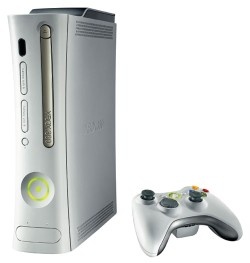 Anandtech first published and then pulled a rather sensationalist article which slandered processing power of the next generation gaming consoles of Sony and Microsoft. The article suggested that Anandtech had discussed with developers who had been in touch with the hardware, and therefore had first hand information. According to their sources the designs are cache crippled and exotic.
 It is being reported on some news sites that some raids took place today against Internet "warez" groups. It has been confirmed so far that there was at least one arrest against a Fremont man. Chirayu Patel, 24, was arrested yesterday accused of setting up hardware and running a site for a group called Boozers; who are famous online for releasing pirated DVDR copies of movies. Apparently the FBI unmasked a number of piracy groups by making massive amounts of storage space available to them.
 Apple has announced that it has merged the iPod with the iPod Photo, making way for a new line of iPod players that have colour screens and the ability to view album art work, photos and slide shows aswell as listening to music. The announcement came at the same time that Apple
  It is simply advertised as a way to assist in converting your private collection of VHS and DVD originals to DVD. It also has a disclaimer that Macrovision may have forgotten to mention that reads...





