
xp-AntiSpy v3.98
Freeware
Vista / Win2k / Win7 / WinXP
Vista / Win2k / Win7 / WinXP
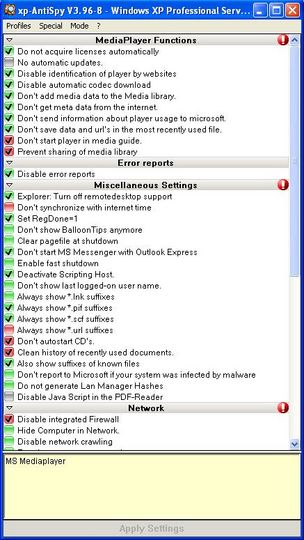
xp-AntiSpy is a little utility that lets you disable some built-in update and authentication
features in WindowsXP. For example, there's a service running in the background which is called 'Automatic Updates'. One might not know what this service transfers from one's machine to other machines on the internet, especially the MS ones. So to play it safe and it might be a good idea to disable such functions. xp-AntiSpy is customiseable, but it comes up with the default sessions, which are recommended for normal users.
features in WindowsXP. For example, there's a service running in the background which is called 'Automatic Updates'. One might not know what this service transfers from one's machine to other machines on the internet, especially the MS ones. So to play it safe and it might be a good idea to disable such functions. xp-AntiSpy is customiseable, but it comes up with the default sessions, which are recommended for normal users.
Screenshots:
Other editions:
HTML code for linking to this page:
Keywords:
xp-antispy
disable
windows
windows xp
autentication
automatic updates
updates
License type
Freeware1
Author's homepage
Visit the author's site
Date added
23 Nov 2011
Downloads
10,477
File size
397.17 kB
(<1min @ 1Mbps)
Operating systems
Vista / Win2k / Win7 / WinXP1
1License and operating system information is based on latest version of the software.
xp-AntiSpy v3.98(Latest stable version) 23 Nov 2011
xp-AntiSpy v3.98 Beta 21 Jun 2011
xp-AntiSpy v3.97-12 beta 01 Apr 2011
xp-AntiSpy v3.97-11 01 Mar 2011
xp-AntiSpy v3.97-10 02 Jan 2011
xp-AntiSpy v3.97-9 23 Jan 2010
xp-AntiSpy v3.97-8 06 Jan 2010
xp-AntiSpy v3.97-7 27 Dec 2009
xp-AntiSpy v3.97-6 24 Nov 2009
xp-AntiSpy v3.97-5 04 Nov 2009
xp-AntiSpy v3.97-4 25 Oct 2009
xp-AntiSpy v3.97-4 Beta 3 20 Oct 2009
xp-AntiSpy v3.97-3 02 May 2009
xp-AntiSpy v3.97-2 26 Feb 2009
xp-AntiSpy v3.97.1 23 Feb 2009
xp-AntiSpy v3.97 24 Oct 2008
xp-AntiSpy v3.97 Beta 3 05 Jul 2008
xp-AntiSpy v3.97 Beta 2 26 Jun 2008
xp-AntiSpy v3.96-8 04 Mar 2008
xp-AntiSpy v3.96-7 18 Jan 2008
xp-AntiSpy v3.96-6 29 Aug 2007
xp-AntiSpy v3.96-5 16 Jul 2007
xp-AntiSpy v3.96-5 Beta 3 11 May 2007
xp-AntiSpy v3.96-5 Beta 2 04 May 2007
xp-AntiSpy v3.96-4 05 Nov 2006



The following was extracted from the xp-AntiSpy help file:
The connection limit was introduced by Microsoft with Service Pack 2 for Windows XP and Service Pack 1a for Windows 2003. It limits the connection requests at a time to 10. This should prevent malware from goin’ bezerk on your system and spreading its seed rapidly all around the network.
Some programs, for example filesharing software, sometimes reach the limit and therefore cannot perform as required without the limit.
Performance is not meant as bandwidth in this context.
You can check for yourself if your system reaches the limit. Take a look in the event viewer (hit start->run and enter Eventvwr.msc). When you click the System entry, take a look at the row named Event ID. If you see the number 4226 being displayed, then your system has reached the limit at that time.
To increase connection limit go to Special>Connection Limit which will bring up a dialog box with a message. Click ‘Yes,I got it’.