
Feedback
 
AfterDawn.com

Site update - March 16th 2010

AfterDawn.com has been updated! In addition to renewing the layout of the site we have also speeded up things considerably. The new version has been tested on our Finnish site for several months, and during the testing we have managed to improve the new version even further.

You can now enjoy this new layout at English AfterDawn.com and English Discussion Forums as well! We have also introduced new sections to the site, and re-arranged things a bit.

Read more about the update and let us know what you think!

Close this message

GMER v1.0.15.15281

Freeware
Win2k / WinNT / WinXP

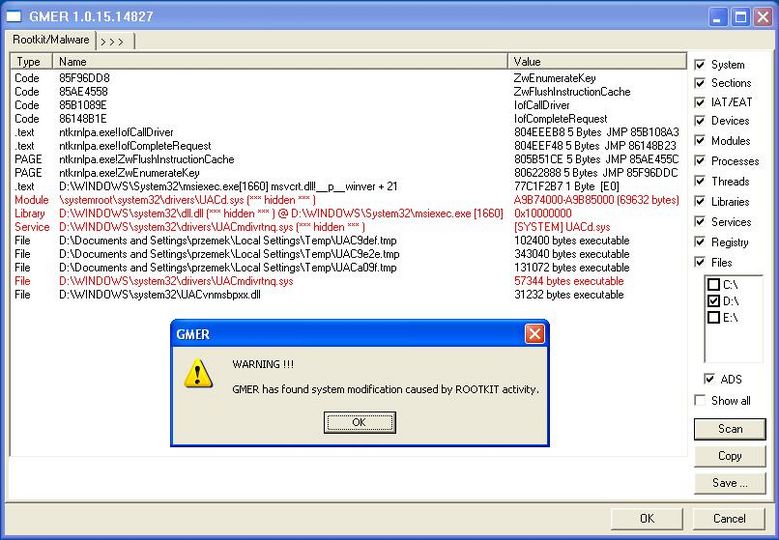
GMER is an application that detects and removes rootkits.

It scans for:
  • hidden processes
  • hidden threads
  • hidden modules
  • hidden services
  • hidden files
  • hidden Alternate Data Streams
  • hidden registry keys
  • drivers hooking SSDT
  • drivers hooking IDT
  • drivers hooking IRP calls
  • inline hooks


GMER also allows to monitor the following system functions:
  • processes creating
  • drivers loading
  • libraries loading
  • file functions
  • registry entries
  • TCP/IP connections


Share this

Keywords:
gmer rootkit scanner remove

License type Freeware1
Author's homepage Visit the author's site
Date added 30 Jan 2007
Latest update 17 Dec 2009
Downloads 1,687
File size 278.24 kB (<1min @ 1Mbps)
Operating systems Win2k / WinNT / WinXP1

1License and operating system information is based on latest version of the software.

If you do not have an AfterDawn.com account yet, please enter your nickname and email address below. An activation link will be emailed to you.

If you already have an AfterDawn.com account, please login using the next tab.


Login by using your Afterdawn.com -username or your email address.

Sudds AfterDawn Addict
  GMER v1.0.15.15011

Great piece of kit, note that it also works on Vista.

31 Jul 2009
geaf Newbie
  GMER v1.0.15.14878

This is a great utility. It has a bit of a learning curve to it and, admittedly, I still don't understand a lot of it but I know one thing, it definitely finds the rootkit activity and also is great at disabling it/deleting it. <br/>I have used this a few times on different clients' PCs and it has been a great tool every time. <br/>Recommended! <br/>Keep it on a USB stick along with some other fine freebie security tools like smitfraud fix and ComboFix and you'll be prepared for quite a lot of common attacks!

12 Mar 2009
