User User name Password  
   
Sunday 6.7.2008 / 08:22 PM
Search:        In English   Suomeksi   På svenska
afterdawn.com > software > video software > dvd rippers > autogk v2.40
Show topics
Software
Software


AutoGK v2.40

This is an old version of this software. You can also download v2.45 (latest stable version) or v2.48 Beta (update) (latest beta version).

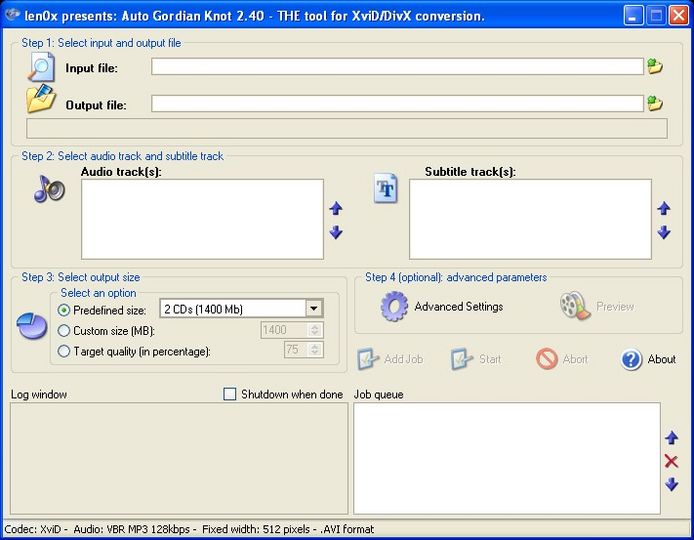
AutoGK (Auto Gordian Knot) is powerful and very easy to use tool for making DVD rips. It was designed for people who know very little about video conversion. It includes everything you need to rip DVD to DivX/Xvid in very easy-to-use interface.

Creating perfect DivX/XviD with AC3 or VBR-MP3 soundtracks is extremely easy, since AutoGK is able to calculate the maxium bitrate that can be used for video to still fit in on the selected CD/DVD size.

contains following codecs and tools:

VirtualDubMod
AviSynth
BeSweet
DVD2AVIdg
XviD
VobSub

DivX is also supported, but you need to download the codec separately.
AutoGK
License: Freeware
Operating Systems: Win2k/ Win95/ Win98/ WinME/ WinNT/ WinXP
Date added: 8.5.2004
Last updated: 11.11.2007
Downloads: 91,766
Filesize: 8.99 MB
Software homepage
Rating: [average of user reviews]
4.11 (27 votes)

= Latest beta version.

= Latest stable version.

= Older release.

What has been updated?

 Review this software
User reviews Show all reviews
discboy 16 March 2008 0:08 for AutoGK v2.48 Beta (update) Voted 5 stars  
AutoGK v2.40
I use this all the time. I have at least 400+ AVI movies on my 1TB usb hard drive. I would recommend this to anyone.
tbok4600 20 April 2007 16:58 for AutoGK v2.40 Voted 5 stars  
EASY, i usually run it @ night while i sleep, and it actually lets me tweak the files size so i can fit an entire tv season onto a DVD5. all in all i give it a 10 out of 10.
Sliztzan 10 April 2007 11:36 for AutoGK v2.40 Voted 5 stars  
Isn't it funny how older programs work better than the new stuff? I searched, tried, and searched again for something that would make this easy. I'm not very informed about video codecs and compression, bit rates and all that stuff. AutoGK works great. I don't know what I'd do without it. It uses the Xvid codec which I think is best for encoding movies.

In other programs that will encode with Xvid, you have to set the encode options manually. This is what I find difficult to get the same output I get from AutoGK, because it does the settings in the background and you don't have to touch it.

For the novice, this is the best program around, even if it is a few years old. It works! Even on XP.
RossPK 10 November 2006 5:46 for AutoGK v2.27 Voted 1 stars  
How the hell is it easy to use exactly?

First off half way through my video it splits into two screens, and then it delays the audio so it's out of synch. Nothing seems to be explained in the guide on how to make it just rip your DVD normally.
Steeldoor 6 March 2006 18:37 for AutoGK v2.26 Voted 1 stars  
Auto Gordian knot is not, I repeat, not a ripping program. It is a tool for converting IFOs to MPEG4 (DivX or XviD) after they have been ripped.
 Review this software
Related forum topics Posts Last post Forum room
AutoGK subs issue, not with all movies. 3 23 6.2008 Subtitle help
Having problem ripping with AutoGk 4 23 5.2008 DVD ripping
AutoGK subtitles and audio 3 17 4.2008 DivX / XviD
AutoGK and Family Guy 3 23 2.2008 DVD ripping
autogk 8 19 2.2008 DVD±R for newbies
Help with subtitles in AutoGK? 3 17 2.2008 DivX / XviD
AutoGK and video bitrate + quality question 3 11 2.2008 DivX / XviD
AutoGK Help 3 16 1.2008 DivX / XviD
Using AutoGK 9 13 12.2007 DivX / XviD
AutoGK VOB - to - AVI Error 6 2 11.2007 DivX / XviD

Digital video: AfterDawn.com | AfterDawn Forums | DVD X Copy Forums
Music: MP3Lizard.com
Gaming: Blasteroids.com | Blasteroids Forums
Software: Software downloads
Blogs: User profile pages
RSS feeds: AfterDawn.com News | Software updates | AfterDawn Forums
International: AfterDawn in Finnish | AfterDawn in Swedish | download.fi | fin.MP3Lizard.com
Navigate: Search | Site map
About us: About AfterDawn Ltd | Advertise on our sites | Rules, Restrictions, Legal disclaimer & Privacy policy
Contact us: Send feedback | Contact our media sales team
 
  © 1999-2008 by AfterDawn Ltd.