
User User name Password  
   
Sunday 29.11.2009 / 02:02 PM
Search AfterDawn.com:        In English   Suomeksi   På svenska
afterdawn.com > software > video software > video encoders > ffmpeg rev10464
Show topics
Software
Software


FFmpeg rev10464

This is an old version of this software. You can also download rev12665 (latest stable version) or rev12572 (latest beta version).

FFmpeg is a complete solution to record, convert and stream audio and video.

It is a command line tool to convert one video file format to another. It also supports grabbing and encoding in real time from a TV card. The command line interface is designed to be intuitive, in the sense that FFmpeg tries to figure out all parameters that can possibly be derived automatically. You usually only have to specify the target bitrate you want. FFmpeg can also convert from any sample rate to any other, and resize video on the fly with a high quality polyphase filter.

Other editions:
ffmpegX for Mac OS X


FFmpeg
License: Freeware
Operating Systems: Vista/ Win2k/ Win95/ Win98/ WinME/ WinNT/ WinXP
Date added: 30 Sep 2007
Last updated: 02 Apr 2008
Downloads: 9,157 
Filesize: 2.46 MB
Software homepage: Click here
Rating:   [arvostelu]
4.00 (1 votes )

= Latest beta.

= Latest stable version.

= Older versio.

  Review this software
User reviews
fwupow 27 Oct 2009 19:37
FFmpeg rev12665
4 tähteä  
Here's the basics. FFmpeg was developed for Linux, but there are builds available for Windows. It's in a constant state of development. It's a command-line controlled program (Do you still DOS?) Documentation is poor. Some video transcoding software utilizes FFmpeg. There are also several "FFmpeg GUIs", which come with a particular version of FFmpeg, which is usually outdated. Often the GUI can not interface with a newer version of FFmpeg. FFmpeg has it's own internal encoders which are quite fast. Some builds of FFmpeg also include open-sauce, free, encoders like LameMp3 and XviD, which allow you to use whatever version of the out-sourced encoder was built into the FFmpeg executable/binary/windows program.

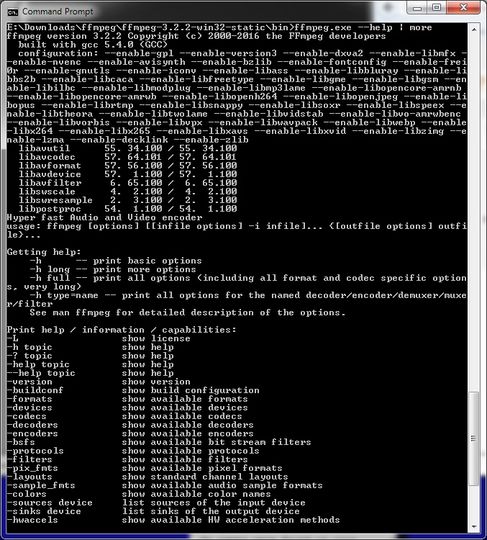
FFmpeg includes a myriad of command-line options/switches to control encoding. These are very poorly documented (i.e. range and type of permissible values are not given). If you enter '-h' at a command prompt, you'll get a list of available options/switches which may or may not be up-to-date or applicable to that particular version. Interestingly the documentation at the FFmpeg website doesn't list half as many options as you get from the HELP function.

If you can ever understand all the various options, you may be able to create high-quality encodes. ;-)
If you're a DOS command-line freak, this is your day.

  Review this software
Related forum topics Posts Last post Forum room
FFMpeg not working error 2 6 August, 2009 Software discussion
How do I encode 5.1 audio with FFMPEG and WinFF? 3 12 August, 2008 Software discussion
FFMPEG and DVD Flick 4 18 April, 2008 DVD±R - One-click transcoding tools
Difference between ffmpeg and MEncoder 2 11 February, 2008 HD DVD discussion
ffmpeg 2 19 January, 2007 DVD±R for advanced users
is FFMPEG a good encoder? 5 24 March, 2006 DVD-Rebuilder forum
FFmpeg, avi script with psp video9? 5 23 February, 2006 Sony PSP - Mod and firmware discussion
help me please with ffmpeg 5 6 August, 2005 Audio
my G5 doesn't seem to let FFMpeg or Toast convert AVI 8 18 April, 2005 Digital video discussion for Mac users
Playback Probs with FFMPEG Decoder 3 8 March, 2005 Playback problems

Last week's most popular software downloads

Digital video: AfterDawn.com | AfterDawn Forums
Music: MP3Lizard.com
Gaming: Blasteroids.com | Blasteroids Forums | Compare game prices
Software: Software downloads
Blogs: User profile pages
RSS feeds: AfterDawn.com News | Software updates | AfterDawn Forums
International: AfterDawn in Finnish | AfterDawn in Swedish | download.fi
Navigate: Search | Site map
About us: About AfterDawn Ltd | Advertise on our sites | Rules, Restrictions, Legal disclaimer & Privacy policy
Contact us: Send feedback | Contact our media sales team
 
  © 1999-2009 by AfterDawn Ltd.
