
SUPER 2020 Build 77
Ad-supported
Vista / Win10 / Win7 / Win8 / WinXP
Vista / Win10 / Win7 / Win8 / WinXP
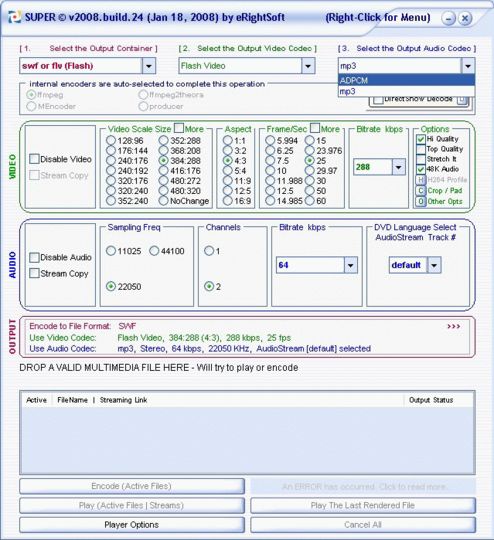
SUPER, Simplified Universal Player Encoder & Renderer. A GUI to ffmpeg, mencoder, mplayer, x264, ffmpeg2theora & the theora/vorbis RealProducer plugIn.
If you need a simple, yet very efficient tool to convert (encode) or play any Multimedia file, without reading manuals or spending long hours training, then SUPER is all you need. It is a Multimedia Encoder and a Multimedia Player, easy-to-use with 1 simple click.
SUPER supports a wide variety of input/source file format to play or encode (to & from) without any additional third party software:
Video format: 3gp/3g2 (Nokia, Siemens, Sony Ericsson), asf, avi (DivX, H263, H263+, H264, Xvid, MPEG4, MSmpeg4, etc..), fli, flc, flv (Flash), mpg (MPEG-1 & MPEG-2), mov (H263, H263+, H264, MPEG4, etc..), mp4 (H263, H263+, H264, MPEG4), ogg, qt, rm, str (PlayStation), swf (Flash), viv, vob, wmv
Audio format: ac3, amr, mp2, mp3, mp4, ogg, ra, wma
AviSynth Script Files: avs. ALL Input/source files that fail to encode, will be encoded without error when using AviSynth scripts.
Please note! Program is nowadays adware and asks you to co-install an advertisement element when installing the software itself.
If you need a simple, yet very efficient tool to convert (encode) or play any Multimedia file, without reading manuals or spending long hours training, then SUPER is all you need. It is a Multimedia Encoder and a Multimedia Player, easy-to-use with 1 simple click.
SUPER supports a wide variety of input/source file format to play or encode (to & from) without any additional third party software:
Video format: 3gp/3g2 (Nokia, Siemens, Sony Ericsson), asf, avi (DivX, H263, H263+, H264, Xvid, MPEG4, MSmpeg4, etc..), fli, flc, flv (Flash), mpg (MPEG-1 & MPEG-2), mov (H263, H263+, H264, MPEG4, etc..), mp4 (H263, H263+, H264, MPEG4), ogg, qt, rm, str (PlayStation), swf (Flash), viv, vob, wmv
Audio format: ac3, amr, mp2, mp3, mp4, ogg, ra, wma
AviSynth Script Files: avs. ALL Input/source files that fail to encode, will be encoded without error when using AviSynth scripts.
Please note! Program is nowadays adware and asks you to co-install an advertisement element when installing the software itself.
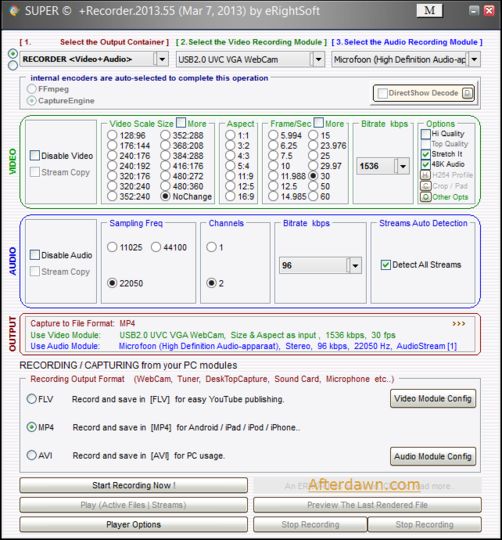
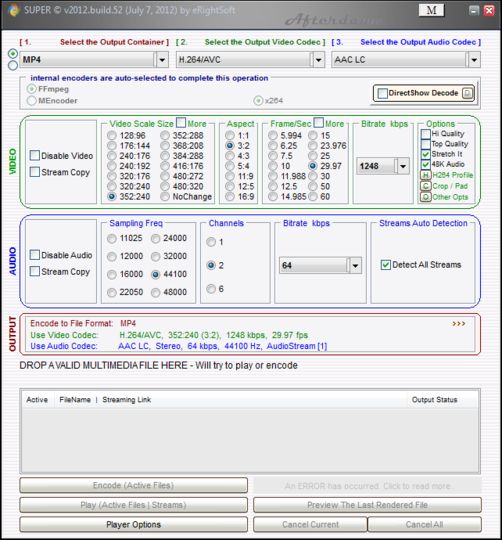
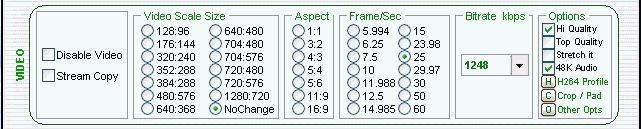
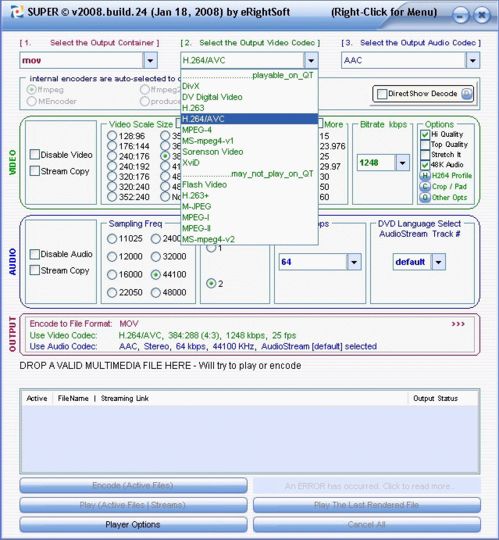
Screenshots:

HTML code for linking to this page:
Keywords:
super
encode
convert
gui
easy
asf
avi
License type
Ad-supported1
Author's homepage
Visit the author's site
Date added
24 Feb 2020
Downloads
2,237,113
File size
27.72 kB
(<1min @ 1Mbps)
Supported languages
English
Operating systems
Vista / Win10 / Win7 / Win8 / WinXP1
1License and operating system information is based on latest version of the software.
SUPER 2020 Build 77(Latest stable version) 24 Feb 2020
SUPER v2019 Build 76 09 Aug 2019
SUPER v2019 build 75 20 Jan 2019
SUPER v2018 Build 74 24 Jun 2018
SUPER v2018 Build 73 19 May 2018
SUPER v2018.Build.72 20 Jan 2018
SUPER v2017 build 71 10 Apr 2017
SUPER v2016 Build 70 16 Dec 2016
SUPER 2016 Build 69 04 Apr 2016
SUPER 2016 Build 68 12 Mar 2016
SUPER 2016 Build 67 06 Mar 2016
SUPER v2015.build.66 31 Oct 2015
SUPER v2015 build 65 31 May 2015
SUPER v2015 build 64 15 Feb 2015
SUPER v2014 build 63 30 Nov 2014
SUPER v2014 build 62 21 Sep 2014
SUPER v2014 build 61 23 Jun 2014
SUPER v2014 build 60 18 Feb 2014
SUPER v2013 build 59 18 Dec 2013
SUPER v2013 build 58 14 Nov 2013
SUPER v2013 Build 55 07 Mar 2013
SUPER v2012 Build 54 18 Nov 2012
SUPER v2012 build 53 03 Oct 2012
SUPER v2012 build 52 10 Jul 2012
SUPER v2012 build 51 19 Apr 2012
SUPER v2012 Build 50 23 Feb 2012
SUPER v2011 Build 49 02 Jul 2011
SUPER v2011 Build 48 23 Apr 2011
SUPER v2011 Build 47 13 Mar 2011
SUPER v2011 Build 46 15 Feb 2011
SUPER v2011 Build 44 21 Jan 2011
SUPER v2010 Build 42 07 Nov 2010
SUPER v2010 Build 41 01 Nov 2010
SUPER v2010 Build 39 25 Oct 2010
SUPER v2010 Build 38 03 May 2010
SUPER v2010 Build 37 04 Jan 2010
SUPER v2009 Build 36 12 Jun 2009
SUPER v2009 Build 35 05 Jan 2009
SUPER v2008 Build 33 02 Sep 2008
SUPER v2008 Build 32 08 Jul 2008
SUPER v2008 Build 30 23 Mar 2008
SUPER v2008 Build 25 07 Feb 2008
SUPER v2008 Build 24 22 Jan 2008
SUPER v2007 Build 23 04 Jul 2007
SUPER v2007 Build 22 19 Mar 2007
SUPER v2007 Build 21 05 Jan 2007
SUPER v2006 Build 19 17 May 2006



Thanks Afterdawn !
I have converted 6 films from 2D to 3D to watch on TV. Amazing
LAME!
YKWBS?!!! The installer of Super Converter. Installer WILL EXPIRE after few installation times on computers, which is ANNOYING! Can you REMOVE that shit, its pain-in-the-ass forcing users to update, update and always update! I dont want it! Id rather stay with 2011 and nothing else... (installing) Uh, shit, cannot install just to warn user to update it... Better get other converters, coz this is BULLSHIT!
has tons of options and now it comes with this recorder.
It is 10/10
--Jim
It doesnt "take control" but a window with the adware will pop up over and over and over moving your mouse to next button each time. Conveniently making it easy to accidentally click the Next, installing the adware.
download this software off of erightsoft.com for legit copy.
I must say that there IS ABSOLUTELY NO ASWARE in here.
EULA is extremely clear and transparent related to this matter. Uncheck the box in case you want to decline. Is it that hard ???
I rated 5 stars cause its a brillant freeware.
pros: plenty of config to get file to whatever desired result you want
contrary to the bs stated in this topic by other you get what you dont decline so hit it even if it appears greyed out
cons:perhaps too many config options..lol..
as red would say "dumbasses" will have problems after installing
Afterdawns reply starts here: Thank you for contacting us. Some other people have reported this to us, too. However we tested it on one of our Win7 PCs here and it caused no problems, altho suggesting we to install an adware during the installation process (but by simply checking that the box wasnt ticked was enough
to prevent it). Is this something you experienced .. or?
I made the actions of Super very clear, my email to AD.com starts here: It is your obligation to test this program again. It is your obligation to test this program again. Assisting or ignoring the spread of malicious software is an unforgivable act.
You could not have tested the same file I downloaded from your server. This/my computer is a fresh install of Win7 64, with Microsoft Security Essential and AVG 2013 running with real time protection. This is my company’s video editing computer; it never sees unknown/porn websites.
After opening that setup file, I had no control of my mouse as the install was controlling it, constantly moving it to the edge of the screen. If I moved my mouse, it would shoot back to the edge of the screen. This kept me form closing the install.
The install also, Tab-ed its way through more than one (Next button), then toggling the (I accept) on more than one checkbox, accepting whatever it wanted.
Using Task Manager was also not helpful, as the install instantly regained focus. The only way I stopped the install was to shut down the OS by holding the power button.
I have no other Free/trialware on my computer aside from Avisynth, and Virtualdub, while waiting for one of the downloads to start, I saw Super as one of the suggested program to try. I was there getting program for testing render speeds against Adobe Media Encoder. Now, I know you are not going to tell me Avisynth, or Virtualdub is behind this type of behavior.
It is your obligation to test this program again. Assisting or ignoring the spread of malicious software is an unforgivable act.
Extremely fast rip off mp3 or aac from youtube files. Great job
Very rich with codecs & options.
Very easy for converting videos on my Galaxy Note II
the current version available here ate afterdawn has become totally useless.
The Setup file throws an error message saying: Outdated, Obsolete version.
THIS IS NOT BUILD 50 hosted in here.
the new Build.50 is 49MB
afterdawn.com did not update correctly.
it is always ranked amongst the "Top downloads" on this site.
i mostly use it to convert any video fotmat to WEBM
anybody know how to fix it? or if they are working on a fix?
It has a very rich video and audio codecs settings and the failure ration is extremely low.
we have tested/tried around 9 other encoders in vain..
It works great!
Other softwares propose many containers. SUPER is very rich in video and audio codecs with a whole range of containers.
It also join, split, mux and demus files.
A great program, the best
It deserved the 5 stars and for whoever worked on this piece of software I would say: THANK YOU!
I surely recommend using this 2011.b.47 version of super encoder.
Thats awesome, i am converting most my MKV file to my PSP flawlessly.
I also encoded couple of old MPG file to flv and hosted them at YouTube. Thank you for providing this great application for free.
Excellent freeware easy to use to render Webm format for my HTML5 website
Avoid downloading and installing the new version, and find an older version and you will be in great shape.
Sadly, its slow and requires tons of cpu resources.
Many times, after 24hrs of video encoding, Ill playback the file and itll look terrible. Ive played with all the settings and have yet to find a good setup.
Works great with all the audio files and has handy presets.
Recommend!
As promised a few choice were made and the program delivered a working mpg.
However I did find that in order to make the program work you must be in at least 1026 x 860 otherwise the controls to encode are not displayed. The only other problem was where the output file was going. This was hidden in the right click menu. I do not see why it is not present like all the other choices on the main window.
As someone mentioned before, this is NOT a piece of spyware or a trojan or any type of malware. I also scanned it using several scanners when someone said it was dangerous. There's nothing wrong with it.
The only thing that prevents me from giving SUPER 5 stars it that it cannot convert SWF files to another format.
Don't waste your time downloading this.
I hope the "Developer' of this program is reading this. I downloaded this program and installed it two different times ... and somehow it crashes my other programs ...
1) My DVDShrink preview window all of a sudden looks wqashed up (the best that I can describe it).
2) It crashed my "DirectVobSub" player.
3) The "Preview" feature of the SUPER program runs funny ... the Video playback looks "Washed Up" color.
Program seems to work ... like I said if they can fix up the other problems I think it would a "Great Tool".
Also maybe someone can write a "Dummy Guide" for those of us that don't knwo all the proper Scales and formats.
Thanks,
G!
Message to aRTynz above:
On my W2K box I had headache with the menus as well, but after I changed the skin from the right-click menu it sorted itself out. So, obviously skin related. Works perfectly with another skin :-)
Just one thing - I have the latest version, build 19, and the drop down menus do not work properly. They do not drop down when clicked. The only way I can negotiate them is to click and then use up or down arrow and repeat this to move through all items. My system is Win-XP and is fully up to date with software upgrades.
I cannot find a place to send email so this seems the only place I can mention this. Thanks.