
Synergy for Mac OS X v1.5.1
Open source
OSX
OSX
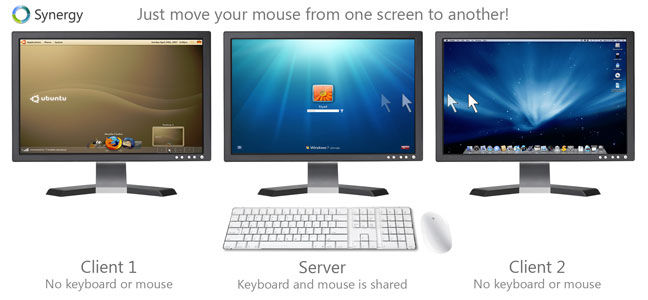
Synergy lets you easily share a single mouse and keyboard between multiple computers with different operating systems, each with its own display, without special hardware. It's intended for users with multiple computers on their desk since each system uses its own monitor(s).
Redirecting the mouse and keyboard is as simple as moving the mouse off the edge of your screen. Synergy also merges the clipboards of all the systems into one, allowing cut-and-paste between systems. Furthermore, it synchronizes screen savers so they all start and stop together and, if screen locking is enabled, only one screen requires a password to unlock them all.
Synergy requires Mac OS X v10.2 or higher.
Redirecting the mouse and keyboard is as simple as moving the mouse off the edge of your screen. Synergy also merges the clipboards of all the systems into one, allowing cut-and-paste between systems. Furthermore, it synchronizes screen savers so they all start and stop together and, if screen locking is enabled, only one screen requires a password to unlock them all.
Synergy requires Mac OS X v10.2 or higher.
Screenshots:
Other editions:
HTML code for linking to this page:
Keywords:
synergy
keyboard
mouse
remote
control
mac
License type
Open source1
Author's homepage
Visit the author's site
Date added
26 Aug 2014
Downloads
7,820
File size
11.54 MB
(< 2min @ 1Mbps)
Operating systems
OSX1
1License and operating system information is based on latest version of the software.
Synergy for Mac OS X v1.5.1(Latest stable version) 26 Aug 2014
Synergy for Mac OS X v1.5.0 23 Jul 2014
Synergy for Mac OS X v1.4.18 Beta 18 May 2014
Synergy for Mac OS X v1.4.17 25 Mar 2014
Synergy for Mac OS X v1.4.16 Beta 24 Feb 2014
Synergy for Mac OS X v1.4.15 Beta 23 Oct 2013
Synergy for Mac OS X v1.4.14 Beta 19 Oct 2013
Synergy for Mac OS X v1.4.12 Beta 24 Aug 2013
Synergy for Mac OS X v1.4.10 Beta 31 Jul 2012
Synergy for Mac OS X v1.4.2 Beta 20 Feb 2011
Synergy for Mac OS X v1.3.8 06 Sep 2013
Synergy for Mac OS X v1.3.6 22 Jan 2011
Synergy for Mac OS X v1.3.1 30 Sep 2008
(No user ratings yet)


