

The world's most popular messaging platform, Meta-owned WhatsApp has enabled sending messages to yourself. While at first, this might seem like an odd feature, it can be very useful in a lot of situations.
This means that using WhatsApp as a notepad, adding reminders to yourself, or even sharing links is much easier. Some might find that they don't even require a dedicated notepad app with this addition.
This feature also allows fast and easy access to sharing files between different devices. Messaging yourself can be much easier than sending files to a file-sharing service and downloading them on a different device.
For example with pictures, one can simply send them to their own WhatsApp account and open WhatsApp on another device to access the file.
Here's How to Send a Message to Yourself on WhatsApp

Tip: To make it even easier to send messages to yourself, you can pin a conversation, including your own account on the top of the home screen of WhatsApp. Simply click press and hold the conversation after which you can choose to pin in from the pin icon on the top part of the UI.
This feature also allows fast and easy access to sharing files between different devices. Messaging yourself can be much easier than sending files to a file-sharing service and downloading them on a different device.
For example with pictures, one can simply send them to their own WhatsApp account and open WhatsApp on another device to access the file.
Here's How to Send a Message to Yourself on WhatsApp
- Open WhatsApp (on a mobile device or on the computer)
- Click on the new conversation icon on the bottom right.
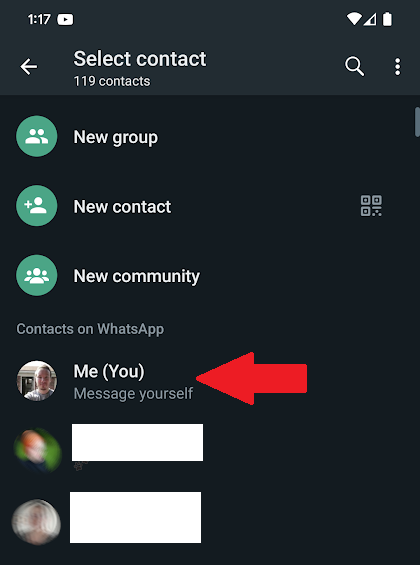
- Select your own account from the list of contacts (should be on the top).
- Send a message just like you would to anyone else.
Tip: To make it even easier to send messages to yourself, you can pin a conversation, including your own account on the top of the home screen of WhatsApp. Simply click press and hold the conversation after which you can choose to pin in from the pin icon on the top part of the UI.




